
For efficient and effortless conversion of .mbox files to .pst file format, Shoviv MBOX to PST Converter is an advanced utility with user-centric features. It can convert MBOX files to Outlook PST, MSG, and EML file formats. This MBOX conversion utility can also export MBOX to On-Premises Exchange Server and Microsoft 365 mailboxes. Shoviv MBOX Converter supports MBOX files from all sources, including Apple Mail, Thunderbird, Entourage, SeaMonkey, Eudora, Spicebird, Mulberry, Google Takeout MBOX, and more.
Demo: Process the first 50 items per folder for free.
For the bulk conversion, Shoviv MBOX to PST tool is a preferred choice that comes with user-centric features. With Shoviv Software, users can convert multiple MBOX files in a single go, and that too in a speedy manner. The software properly maintains the data integrity and preserves the folder hierarchy in the target. If you have large MBOX files, then Shoviv Software's MBOX conversion utility is for you. Users who want to explore a traditional approach can also learn how to convert MBOX to PST manually before choosing an automated solution.
This tool is not just limited to the MBOX to PST Conversion; it offers more. The software is capable of converting MBOX file to PST, EML and MSG file formats. Moreover, it can directly export MBOX file data to Microsoft 365 (Exchange Online) and Exchange On-Premises( all versions) and Outlook Profile. Additionally, the software offers a filter facility and control over the resultant PST file size.
The MBOX file is being created and supported by various email clients/platforms like Apple Mail, Opera Mail, Thunderbird, Entourage, Spicebird, SeaMonkey, and Google Takeout format, and others. To access emails of MBOX in Outlook, there is a need to convert MBOX to Outlook PST( Personal Storage Table)file format. Outlook doesn’t support MBOX files directly. This is a professional utility for efficient and effortless conversion. Users can easily convert MBOX file to PST and access MBOX emails in Outlook.
This MBOX Conversion utility by Shoviv Software keeps the data integrity intact and maintains the folder hierarchy. See the in-depth details:
The tool supports a wide range of MBOX-related mailbox formats, index files, and directory structures to ensure smooth and complete email conversion. MBOX family formats are widely used by the various email clients.
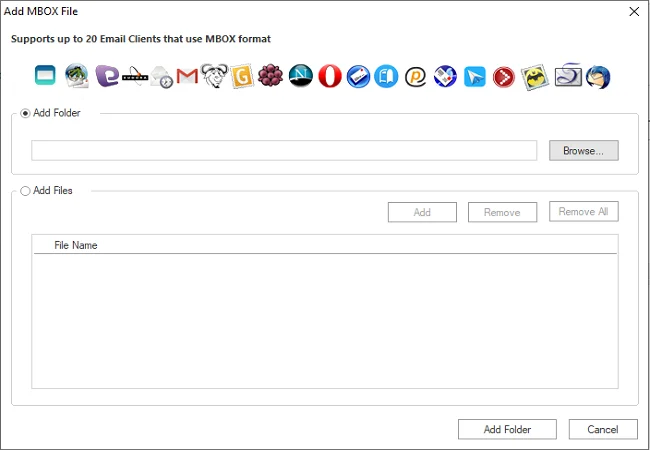
Shoviv MBOX Converter supports MBOX mailbox files created by a wide range of desktop and web-based email clients, including:
Various other email clients also export/sync data in MBOX file format, Shoviv MBOX to PST Converter also supports those MBOX file.
Gmail, Yahoo Mail, AOL Mail, Zoho Mail, Yandex Mail, and MBOX data synced or exported from all IMAP-enabled email accounts.
This professional utility enables you to convert multiple MBOX files at a very high speed. The software comes with an advanced algorithm, hence it can export multiple MBOX files without any size limit, along with attachments, properties, and all attributes without any changes. The Shoviv MBOX Converter offers quick and safe transfer of MBOX to PST, On-Premises Exchange, and Office 365.
The software works flawlessly with various MBOX file formats generated from different email clients and sources. The software is compatible with all MBOX family file formats. It includes MBX, MBOXO (MBOXRD), MBS and MSF, like MBOX family file formats. Be it Thunderbird, Entourage, Gmail, Apple Mail, Google Takeout MBOX files or any other.
The software not only converts MBOX to PST files but also exports MBOX files into file formats like MSG and EML. Moreover, the software comes with enhanced features that allow the user to migrate MBOX to Exchange Online mailboxes, On-Premises Exchange Server mailboxes, as well as to Outlook Profile.
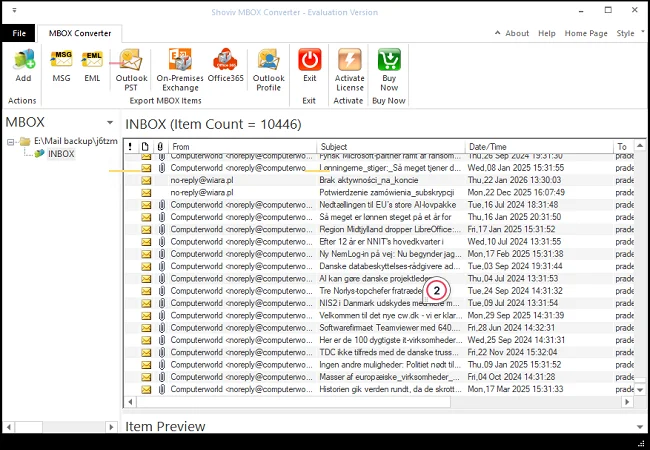
The software offers a preview of the MBOX data before the conversion or exportation task. Using the preview facility, the user can be assured about the MBOX data. Users can directly view the MBOX data in the software with attachments and other attributes before the actual conversion.
This tool comes with a high-end capability that works in various versions of Windows OS. It is compatible with all versions of Windows Operating Systems. Doesn’t matter if you are using Windows 7, Windows 8, Windows 10, Windows 11/ 11 pro or any other version.
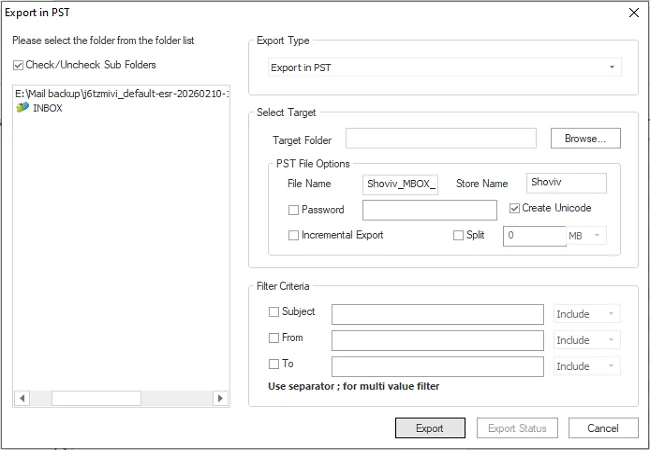
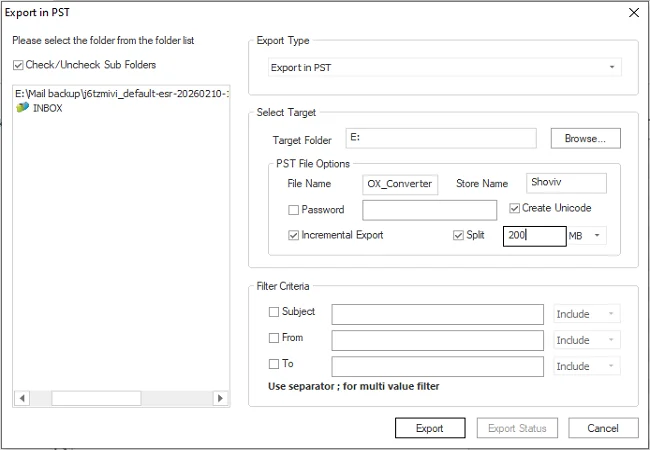
With this professional MBOX Converter, users get control over the desired results in the target. To offer a better and user-oriented working environment, a filter facility based on different criteria is also given within the software. The user can filter on the basis of “Subject”, “From”, and “To” criteria for the selection of data.
The Shoviv MBOX to PST Converter tool comes with a very simple and easy-to-understand interface. Software is easy to use for all types of users, whether they are technical or non-technical. In just a few simple clicks, users can get MBOX data in the desired target.
To provide an advanced working experience to the users, the Shoviv MBOX to PST Converter resumes the process from the last stoppage. No need to restart the process from the beginning; users can restart it where it was left. It also prevents duplicity in the target.
This professional Converter can also manage the size of the resultant PST file when you convert MBOX to PST. If you have an MBOX file of large size but you do not want to have oversized PST files, then here is a PST split option for you. Users can set the PST file size, and the software will split it when reaching the recommended size limit. Moreover, users can set the PST Password and select if they want UNICODE (by default) or ANSI PST type.
Many users also have MBOX files extracted via Google Takeout from Gmail. Google Takeout is a commonly used application offered by Gmail to extract a copy of data from Google products. Users can easily convert MBOX files exported from Gmail into a PST file format that can be opened in Outlook( any version).
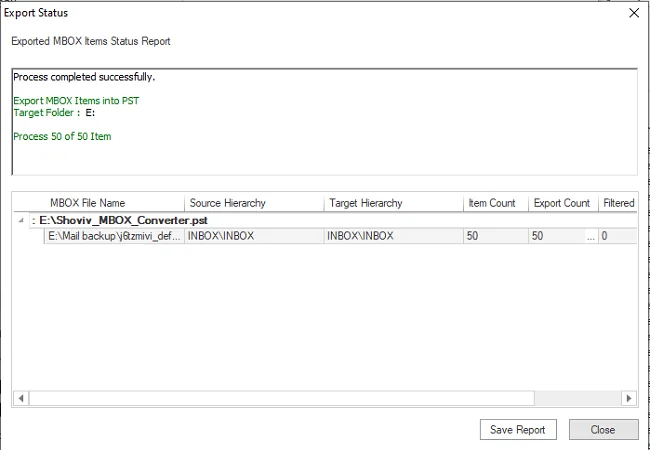
After completing the process, users also get a complete report of the export process. The report includes all the conversion/export process aspects, including total items, processed items, and any failed items. You can also save the report in HTML file format for future reference.
Shoviv offers a free trial version so users can evaluate this utility before purchasing the license. The demo version comes with a limit of the first 50 items per folder. With the licensed version, there are no such limitations, and users can convert multiple MBOX files of any size. The demo version itself upgrades to the full version after assigning the license.
Convert MBOX files to Outlook PST format in minutes just by following a few simple steps:
| Software Features | Trial Version | Full Version |
| Add Multiple MBOX File Folder with hierarchy | ||
| Display and Preview MBOX Item Data | ||
| Export and Saving MBOX Items with Folder hierarchy | First 50 items/Folder | All Items(No Limitation) |
| 100% Secure | ||
| Support all Microsoft Outlook Version | ||
| Support all Microsoft Exchange Server Version | ||
| 24x7 Free Technical Support (By - Live Chat, Emails, Contact-Us Form) | ||
| Price | Free | $39 |
| Free Download | Buy Now |
Follow the steps below to convert a .mbox file to a .pst file format.
Users can simply convert a Google Takeout exported MBOX file to PST file format using the Shoviv MBOX to PST Converter and add PST and access emails in Outlook.
Yes. This utility supports all file formats of the MBOX family, like MBX, MBOXO (MBOXRD), MBS and MSF.
Yes, you can add and view PST files in any version of Outlook. The resultant PST file can be opened in Outlook 2026, 2019, Outlook 2021 and others.
It exports all items of MBOX files to PST format, including the emails, contacts, calendars and attachments.
Users can download the free demo version of the Shoviv MBOX to PST Converter, which allows exporting the first 50 items per folder. For the unlimited conversion, you need to purchase the software license.
The software offers a filter option with criteria “ Subject”, “To” and “From”. Users can use these criteria to exclude and include the items.
The software offers two modes: Outlook Dependent and Outlook Independent. For the conversion tasks like MBOX to PST, EML and MSG, Outlook installation is a must. For the job-based direct migration task in Office 365 and On-Premises Exchange, Outlook is not required.
Shoviv MBOX to PST Converter offers a Split PST option, using which users can set the size for the resultant PST files. The software will split the PST file on reaching the recommended size.
Yes. This tool can convert all the attributes, including the attachments.
The software, by default, maintains the folder hierarchy. You will get the same folder hierarchy in the target as in the source file. It maintains email data, attachments, metadata and other attributes.
You will get the option to browse the location where your resultant PST file gets saved. Select the location where you want to save the PST files.
The demo version is just a restricted version of the full version. This free version offers exporting the first 50 items per folder, while there are no such limitations with the licensed version. The trial version upgrades to the full version after applying the license.
Shoviv Software facilitates 24*7 free technical support with this MBOX conversion utility. Users can connect with the support team using the live chat facility or connect through the telephone number given on the contact us page. Moreover, users can write an email to support@shoviv.com