Blog

+91-8171144903

1-855-257-5251

Products

×
Shoviv Amazon WorkMail to Office 365 Migration

Shoviv Amazon WorkMail to Office 365 Migration Tool

★★★★★
(4.8/5 Based on 424 Reviews)

Shoviv offers a one-stop solution for migrating AWS mailboxes to Office 365 (Microsoft 365 Exchange Online). The Shoviv Amazon WorkMail to Office 365 Migration Tool allows adding multiple mailboxes without any restriction on mailbox size or number. The software is built with advanced features such as bulk migration, migrating only required data, and scheduling migration processes. With this tool, users can also export AWS mailbox data to an On-Premises Exchange Server. It migrates all data like email, contacts, and calendars.

Demo: Process the first 50 items per folder for free. star icon

Prominent Features of the Amazon WorkMail to Office 365 Migration Tool

  • The Shoviv Amazon WorkMail to Microsoft 365 Migration Tool allows users to add multiple mailboxes of any size for migration, with no restrictions.
  • Migrates AWS mailboxes to Office 365 primary mailboxes, archive mailboxes, and public folders.
  • An incremental migration facility is available to prevent duplicate items in Microsoft 365.
  • All Amazon WorkMail data, including emails, contacts, and calendars, gets migrated to Microsoft 365.
  • The tool moves data from AWS WorkMail to all editions of Exchange On-Premises, like Exchange 2016 and 2019.
  • Shoviv Amazon WorkMail to Office 365 Migration Tool supports all versions of the Windows Operating System.
  • A free demo version is available to test the software and process the first 50 items per folder.
  • Along with the software, this utility provides free 24/7 Technical Support.
Amazon WorkMail to Office 365 Migration

Why Do Professionals Choose the Shoviv Amazon WorkMail to Office 365 Migration Tool?

Large-scale mailbox migration

Supports Bulk Migration

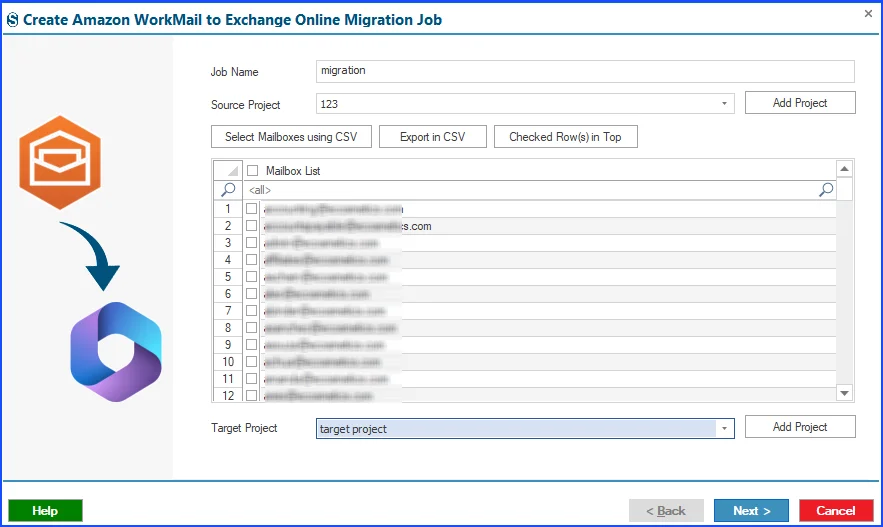
The tool supports bulk mailbox migration. It uses job-based processing that allows users to create and execute multiple jobs simultaneously. In a single job, you can add multiple mailboxes. This parallel processing ensures a fast migration while saving time by efficiently handling large-scale migrations.

Mapping Option

Mapping Facility

Shoviv Amazon WorkMail to Office 365 Migration Tool offers a mapping facility that ensures a secure and accurate migration process. This allows users to match source AWS mailboxes with the corresponding target Microsoft 365 mailboxes. The mapping process provides a smooth and reliable migration experience to users. It helps to get the specific source mailbox data into the desired target mailbox.

Incremental feature

Incremental Migration

The incremental migration feature of this tool ensures continuity in the migration process even if it is interrupted due to any issue. The software restarts the migration process but does not migrate previously migrated mailboxes. This feature filters the already migrated items and only migrates non-migrated items from the mailbox into the target. In this way, it prevents duplicate items and provides an error-free migration process.

Advanced Features Offered By the Shoviv Amazon WorkMail Migration Utility

Support parallel migration process

Thread Count Management

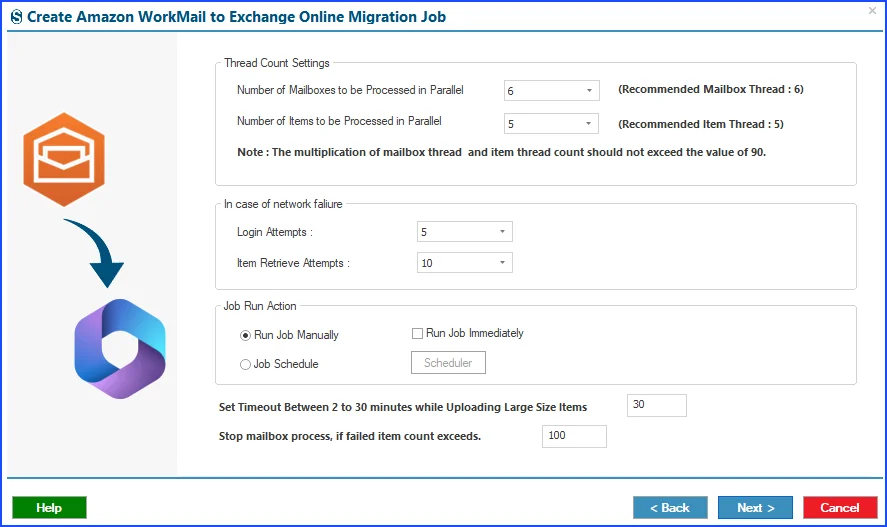
The thread count management feature allows users to set the number of mailboxes to process in parallel. Moreover, also allows specifying the mailboxes' items to process concurrently. Instead of migrating one after another, it migrates mailboxes at the same time. This helps in enhancing the overall speed and performance of the migration process.

Advanced filtering options

Advanced Filtering

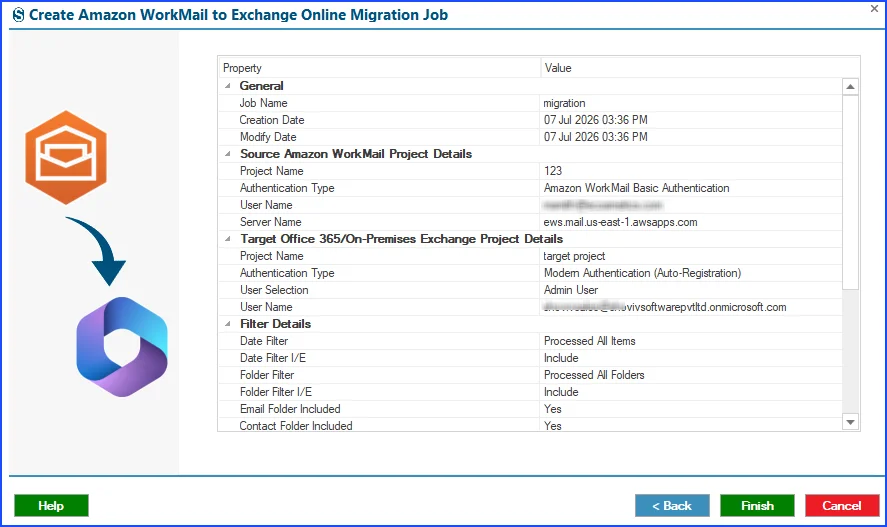
The Shoviv Amazon WorkMail to Office 365 Migration Tool is designed with advanced filtering options. These filtering options help users to include only the required items from AWS mailboxes by applying folder-based and date-range-based criteria. It allows users to include/exclude emails, contacts, and calendars.

Automate Amazon WorkMail Migration

Automate Migration Jobs' Running

This tool offers a scheduling option to automate the migration jobs. It allows users to set up tasks to run on a daily, weekly, monthly, or even on a specific date and time. This ensures that the data is migrated exactly at the scheduled time. Example: Organisations can schedule email migration on weekends or whenever a time is suitable as per the business needs.

Set a limit for the failed items

Failed Items Count Management

It stops the migration process of the mailboxes when the failed items count reaches its limit. With this feature, users can set a limit for the failed items. This saves the user's time by automatically stopping the migration jobs.

Maintains Data's Originality

Maintains Data Integrity

The software ensures that the original data structure and folder hierarchy are preserved during the whole migration process. Users receive a mirror copy of their source mailboxes in the target platforms. This feature maintains consistency, which makes it easier for users to examine their data.

Support multiple type of data migration

Migrates Various Data

It is designed to migrate all types of data from an AWS mailbox, including emails, contacts, metadata, attachments, and calendars. This ensures that any important data is not left behind during the migration process. The Amazon WorkMail to Office 365 Migration Tool efficiently migrates emails, contacts, and calendars to Microsoft 365 mailboxes.

Easy-to-use GUI

User-Friendly Interface

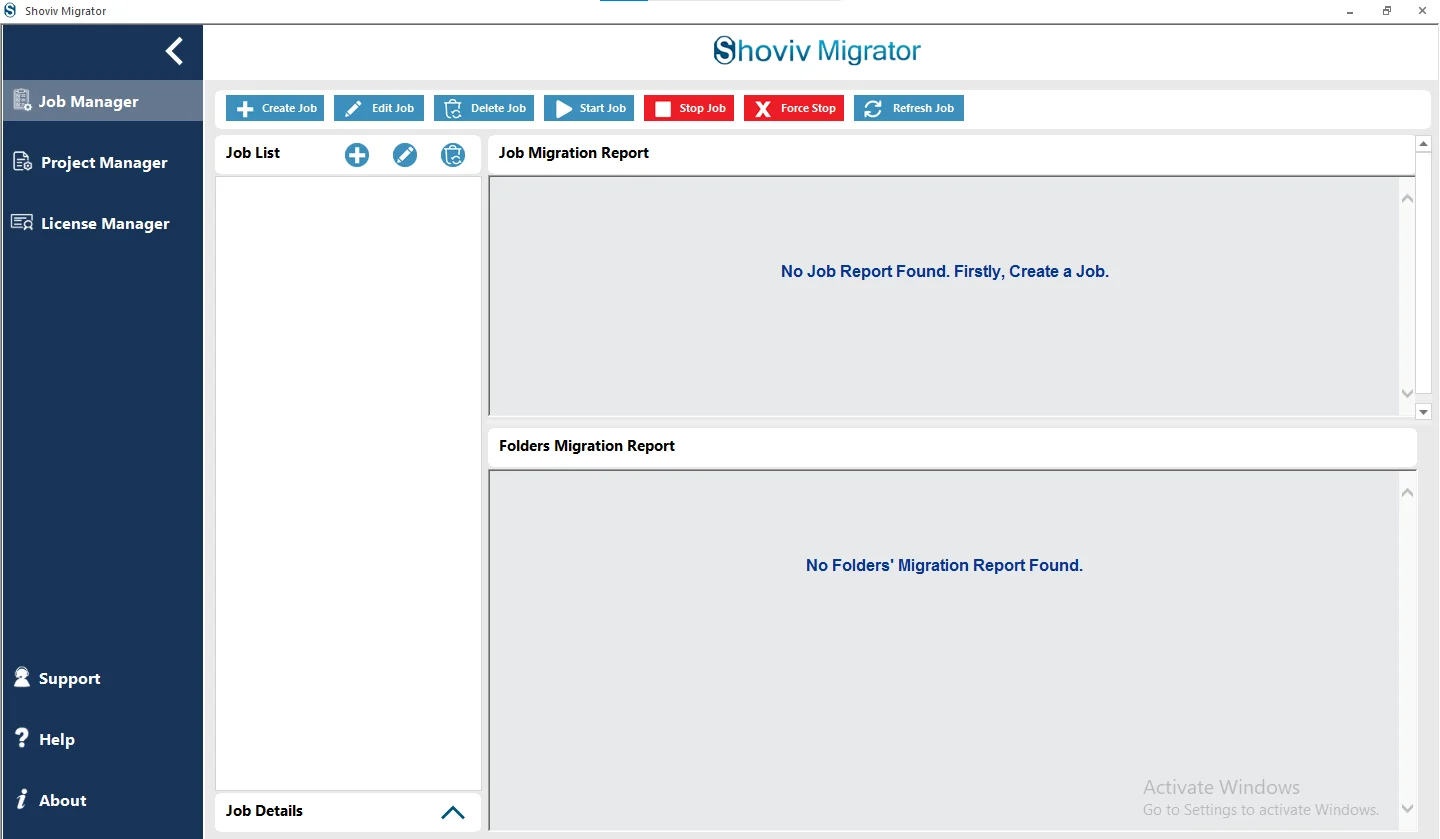
Shoviv Amazon WorkMail to Microsoft 365 Migration Tool comes with a user-friendly interface, which makes it easy to use for both technical and non-technical users. With its simple GUI, it ensures that even beginners can easily manage complex tasks. The step-by-step workflow makes the software easy to use and reduces effort.

Technical Support

Free Technical Support

With this tool, users get free technical assistance if needed. Shoviv's support team is available 24*7 which makes it convenient for the organization across different time zones. The experts guide the users throughout the migration process and offer step-by-step help. The team also addresses all the queries related to the tool and migration tasks. Users can connect through the live chat facility or write to support@shoviv.com.

What Data Does the Shoviv Amazon WorkMail to Office 365 Migration Tool Migrate?

Emails

The tool migrates all Email messages without any data loss, preserving original formatting, fonts, and message properties.

Attachments

All email attachments, including documents, images, PDFs, and other file formats, get transferred securely.

Drafts

Unsent draft messages get transferred so users can pick up right where they left off without losing the unfinished work.

Custom Folders

Folders and subfolders created by users get preserved exactly as they exist in the source mailbox while maintaining consistency.

Contacts

Contact details, including names, email addresses, phone numbers, and related information, migrate accurately.

Calendars

Calendar events, recurring meetings, reminders, and scheduling data get transferred without failure.

Email Metadata

Key properties such as sender, recipient, subject, read/unread status, and categories get preserved throughout the process.

Technical Specifications of Amazon WorkMail to Microsoft 365 Migration Tool

Software Overview Icon
Software Overview
Shoviv Amazon WorkMail to Office 365
Version:
26.7
Software Size:
43.2 MB
License Types:
Based on Number of Mailboxes
Update Frequency:
As required (compatibility-based)
Architecture Supported:
32-bit & 64-bit
Activation Method:
Automatic & Manual Activation
Trial Version:
Yes (Process 50 items per folder for free)
Computer Icon
System Requirement
Processor:
Minimum 1.0 GHz (2.0 GHz recommended)
Memory (RAM):
Minimum 2 GB
Hard Disk Space:
Minimum 1 GB free space
Windows Icon
Supported Platforms
Windows Operating Systems
Desktop:
Windows 7 / 8 / 8.1 / 10 (32-bit & 64-bit)
Windows 11 (64-bit)
Server:
Windows Server 2008 / 2012 R2 / 2016 / 2019 / 2022 / 2025
Virtual Icon
Virtual Environment
VMware® vSphere:
(including ESXi 9.x / 8.x / 7.x / 6.x)
VMware® Workstation Pro:
(All supported versions for Windows)
Microsoft® Hyper-V:
(Windows Server & Windows 11 / 10)
Oracle® VirtualBox:
(All supported versions)

Frequently Asked Questions:

The Shoviv Amazon WorkMail to Office 365 Migration Tool provides the feature of retry attempts. It automatically retries failed migration operations several times until it reaches the limit of item retrieval attempts.
Users can improve the migration speed with the help of mailbox thread and mailbox item thread count, which enables them to run multiple accounts at the same time in a hassle-free manner. However, the throttling policy of Microsoft and internet speed, item size, and other factors also affect the migration speed.
The software provides complete security to data during the migration process. It is built with MFA authentication and an end-to-end encryption model for adding an extra layer of security.
The software provides an advanced filtering option that allows you to choose the desired items from the Amazon WorkMail mailboxes to move into the Office 365 account. Users can include/exclude data based on folder and date range.
No, once a license is activated and assigned to a specific mailbox, it becomes permanently linked to that mailbox. It cannot be reused for a different mailbox account. If you need to migrate additional mailboxes, you'll have to purchase a separate license.
Once you get a licensed version of the software, it has no limitations. Users can add multiple mailboxes to migrate during the process, as long as it doesn't cross the purchased license limit. It supports complete migration of emails, contacts, calendars, and other mailbox items.
What Our Customers Are Saying

Verified Customer Reviews for Shoviv Amazon WorkMail to Office 365 Migration Tool
4.8
★★★★★
Based on 424 verified reviews
5★
87%
4★
12%
3★
1%
2★
0%
1★
0%
clean
clean-download
mcafee-secure
moneyback