Blog

+91-8171144903

1-855-257-5251

Products

×
Microsoft 365 to IMAP Migration

Shoviv Microsoft 365 to IMAP Migration

This tool migrates emails, email attachments, metadata, and folders from the Microsoft 365 mailbox to any IMAP email account in a secure environment. It supports various target IMAP-based email clients such as iCloud, Hotmail, WebMail, Gmail, AOL, Zimbra, Yahoo Mail, and more. It offers several advanced features such as bulk migration, incremental migration, a scheduler, thread count, bad item count, and more.

Demo: Process the first 50 items per folder for free. star icon

Fundamental Aspects of Shoviv Microsoft 365 to IMAP Migrator

  • Shoviv Microsoft 365 to IMAP Migration tool provides a secure environment with MFA and an end-to-end encryption model.
  • Users can migrate to any IMAP-enabled email client or server.
  • It does not impose any limitations on the size and number of mailboxes.
  • Users can migrate multiple accounts at the same time.
  • For the desired outcome of the migration process, the tool provides advanced filtering options.
  • Users have total control over the migration process with user-centric features such as thread count, retry attempts, bad items count, and more.
  • With the delta migration facility, it resumes the migration process from the last point.
  • Users can automate the migration process with the help of the scheduler feature.
  • A free demo version is available for evaluating the tool’s features before proceeding with the licensed version.
Microsoft 365 to IMAP Migration

What Industry Evaluators and Global Clients Say About Shoviv Microsoft 365 to IMAP Tool

Client Testimonials

I have to migrate Microsoft 365 emails to IMAP, but it’s not possible during my office hours. Shoviv’s scheduler feature helps a lot in this, so I don’t have to perform manual migrations. I set the scheduler for my off-hours, and the process is completed automatically without disturbing my daily work.

Sophia Rodridge

I have a large amount of mailbox data that has to be transferred from Microsoft 365 to IMAP email clients. With Shoviv’s Thread Count feature, the migration process is faster. This feature is very useful for transferring multiple threads, and the work is done without any extra effort.

Ron Pedrick

I was going to use the email migration tool for the very first time, so I had a doubt if I could handle the process or not. I gave it a try with Shoviv’s tool; it has a simple interface, which makes the migration process easier. I followed some basic steps, and the process was completed in just a few steps.

Alverd Winger

Why Do Users Need to Migrate Microsoft 365 to IMAP?

Cost Effectiveness

Microsoft 365 can be expensive for individuals and small businesses because Office 365 works on a subscription model, user-based licensing, premium feature charges, and ongoing maintenance. Most of the users need cost-effective platforms, and this cost-effectiveness is provided by IMAP-based email clients. This is the reason why most of the users are migrating towards IMAP-based email clients.

Broad Compatibility

Microsoft 365 might face compatibility issues with some third-party clients, legacy systems, and mixed device environments, and this problem can be solved by IMAP. IMAP provides the solution by offering universal support across platforms like Gmail, Outlook, Apple Mail, and mobile devices. It provides seamless access, better interoperability, and easier integration across different operating systems and applications.

Infrastructure Consolidation

Organizations usually streamline their IT environment by consolidating services onto a single platform. If they already use alternative tools for collaboration, file sharing, or communication, maintaining Microsoft 365 solely for email may be unnecessary. Migrating to an IMAP-based email solution can reduce the complexity, lower costs, and simplify administration.

Business Merger

During a merger between organizations, challenges often arise in terms of integration, data access, and communication continuity. Differences in platforms can lead to synchronization issues, delays, and complexity. IMAP provides a centralized platform for the communication and storage of data. Most of the users shift towards an IMAP-based email client for this reason.

Why Do Professionals Choose Shoviv Microsoft 365 to IMAP Migration?

Multiple MBOX files conversion

Bulk Migration of Email Data

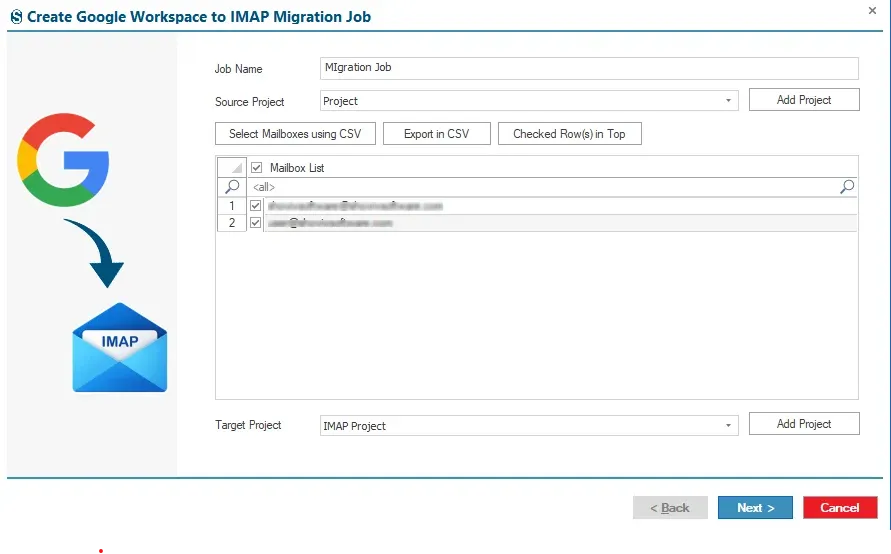
Organizations have a batch of email data to migrate, so they just need a reliable process to migrate bulk email in just a few steps. Showing Microsoft 365 to IMAP Migrator provides the feature of bulk migration with job-based processing. It enables users to create and run multiple migration tasks at the same time. Moreover, users can add multiple accounts within a single job regardless of their size and the number of mailboxes in a hassle-free manner.

Incremental migration

Delta Migration

Most of the industrial experts set the benchmark for the delta migration (incremental migration) feature as a trustworthy solution for the migration process. The tool provides a delta migration feature that resumes the migration process from the last point, or, we say, it restarts the migration process where interruptions occur. It operates only on the modified, untouched, and failed items during the process, ensuring that the duplication of items does not occur and the organization meets the desired result.

Advanced mapping feature

Mailbox Mapping

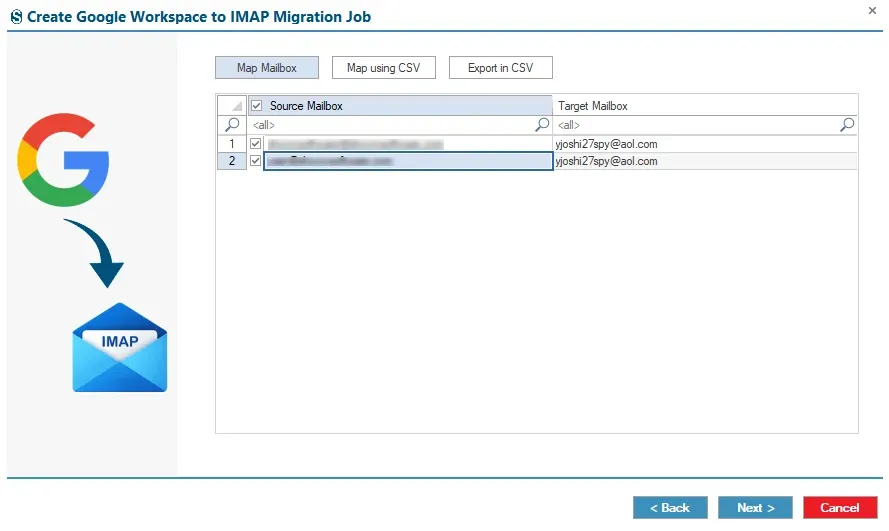
The advanced mapping feature plays a critical role in the accurate and secure migration process. The Shoviv Microsoft 365 to IMAP Migration tool offers an advanced mailbox mapping feature that allows users to efficiently match source and target mailboxes with their corresponding destination mailboxes. This tool supports both manual and map-with-CSV-based file mapping methods, making it easy for users to perform bulk mapping in just one click.

Highlighted Features of Shoviv Microsoft 365 to IMAP Migrator

CSV-Based Mailbox Selection

Selection with CSV-based File

Shoviv Microsoft 365 to IMAP Migration offers an incredible CSV selection feature. This feature enables users to select specific mailboxes from the larger list, which ensures the specific outcome of the migration task.

Advanced Migration Filters

Customizable Filters

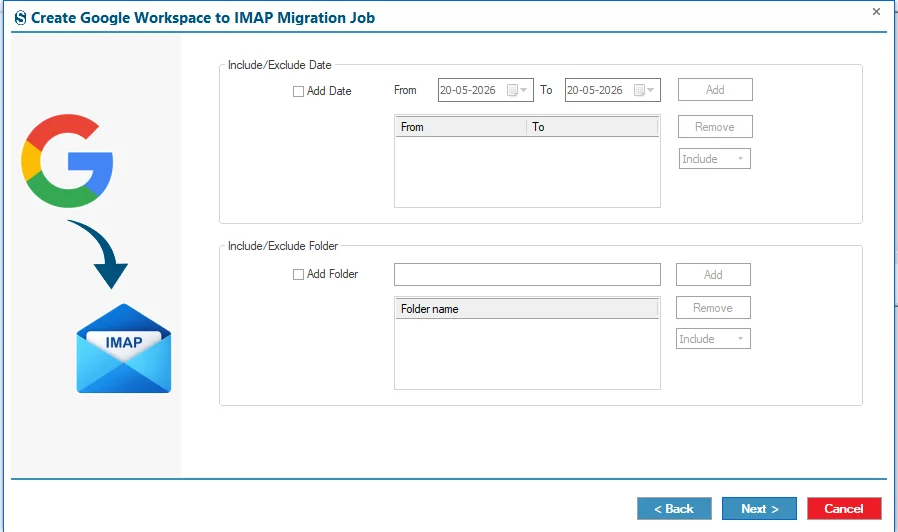
Users can obtain the specific result of the migration process with the help of advanced filtering options, such as date and folder range. It ensures that users get the desired and specific result of the migration process.

Concurrent Thread Control

Thread Count Management

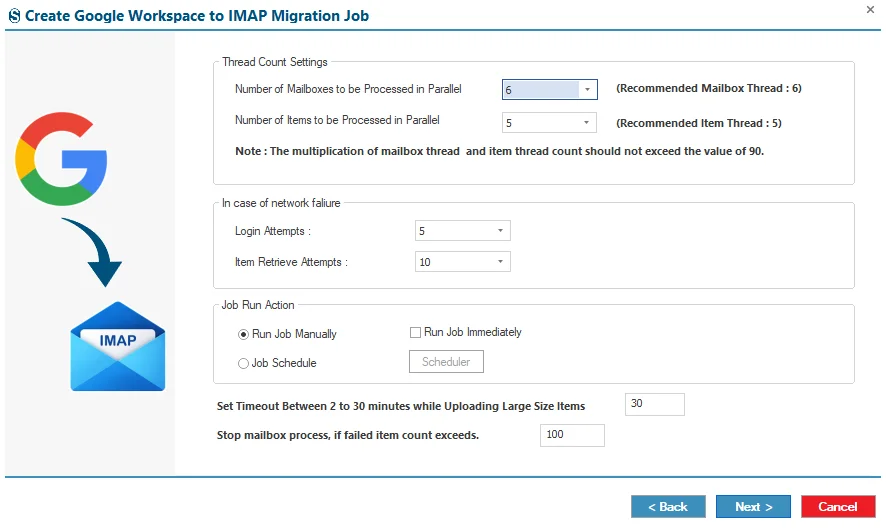
The tool offers the thread and item thread count feature; it allows users to run multiple mailboxes and items within the mailboxes in a parallel and hassle-free manner. This feature speeds up the process and gives accurate results.

Automatic Retry Mechanism

Retry Attempts

With the advanced feature of retry attempts, users can set a limit on the number of retries of the migration for failed items caused by temporary network interruptions. It ensures that the migration process does not get stuck in a loop.

Preserves Data Accuracy

Maintains Data Integrity

Shoviv Microsoft 365 to IMAP Migration software does not alter the integrity and data structure of the source data, and users get the exact mirror copy of the data in the target platform. This tool works on the model of MFA and end-to-end encryption, which secures the users' data.

Bad Item Handling

Bad Items Count

The Bad Item Count feature allows users to set the limit on the failed item count during the migration process. It ensures that the migration process does not halt at the loop point for reprocessing the failed items in a repeated way.

Technical Specifications of Microsoft 365 to IMAP Migration Software

Software Overview Icon
Software Overview
Shoviv Microsoft 365 to IMAP
Version:
26.6
Release Date:
30th June 2026
Software Size:
43.2 MB
License Types:
Based on Number of Mailboxes
Update Frequency:
As required (compatibility-based)
Architecture:
32-bit & 64-bit
Activation Method:
Online & Offline License
Trial Version:
Yes (Process first 50 items per folder for free)
Computer Icon
System Requirement
Processor:
Minimum 1.0 GHz (2.0 GHz recommended)
Memory (RAM):
Minimum 4 GB
Hard Disk Space:
Minimum 512 MB free space
Windows Icon
Supported Platforms
Windows Operating Systems
Desktop:
Windows 7 / 8 / 8.1 / 10 (32-bit & 64-bit)
Windows 11 (64-bit)
Server:
Windows Server 2008 / 2012 R2 / 2016 / 2019 / 2022 / 2025
Virtual Icon
Virtual Environment
VMware® vSphere:
(including ESXi 9.x / 8.x / 7.x / 6.x)
VMware® Workstation Pro:
(All supported versions for Windows)
Microsoft® Hyper-V:
(Windows Server & Windows 11 / 10)
Oracle® VirtualBox:
(All supported versions)

Frequently Asked Questions

No, the software provides a user-friendly interface and step-by-step migration process, making it suitable for both technical and non-technical users.

Yes, the software uses MFA (multi-factor authentication) and end-to-end encryption to ensure secure mailbox migration. It provides a secure environment for the migration from Microsoft 365 to IMAP.

The tool migrates emails, attachments, mailbox folders, folder hierarchy, metadata, read/unread status, and other mailbox properties while maintaining data integrity.

A tenant ID is a unique identifier for your Microsoft 365 organization. It is required to authenticate and connect Microsoft 365 accounts securely.

Yes, the software generates a detailed migration report, including migrated items, job status, and any errors encountered during the migration.

The tool provides the incredible facility of delta migration, which resumes the migration process from the last point.

Yes, the tool supports bulk migration, allowing users to create and run multiple mailboxes at the same time in a hassle-free manner.

Yes, the Microsoft 365 to IMAP migration tool can migrate emails, attachments, mailboxes, folder hierarchy, metadata, and other mailbox properties while maintaining the original data structure and integrity.

clean
clean-download
mcafee-secure
moneyback