Blog

+91-8171144903

1-855-257-5251

Products

×
Amazon WorkMail to IMAP Migration

Shoviv Amazon WorkMail to IMAP Migration

Enables users to perform a seamless and secure migration from AWS WorkMail to any IMAP email client or server. Shoviv Amazon WorkMail to IMAP Migrator comes with a one-stop solution with advanced features and an easy-to-use interface. It offers advanced features such as bulk migration, delta migration, a scheduler, filtering, thread count, retry attempts, and preview, which make it ideal for enterprise-grade use.

Demo: Process the first 50 items per folder for free. star icon

Key Features of Shoviv Amazon WorkMail to IMAP Migrator

  • Shoviv Amazon WorkMail to IMAP Migration allows users to add and run multiple AWS mailboxes simultaneously.
  • It does not impose any limitation on the size and number of mailboxes.
  • The tool does not alter the original data structure and folder hierarchy throughout the migration process.
  • Users can automate the migration task using the scheduler feature.
  • The incremental migration feature resumes the migration task from the last point.
  • It also offers advanced filtering options to obtain the desired outcome of the migration task.
  • A free demo version is available to evaluate the tool’s features before proceeding with the licensed version.
Amazon WorkMail to IMAP Migration

What Global Clients Say About Shoviv Amazon WorkMail to IMAP Migration Tool

Client Testimonials

We were looking for a reliable solution to migrate Amazon WorkMail to IMAP after learning that Amazon WorkMail was being discontinued. Shoviv provided a seamless way to migrate data in bulk. Additionally, the advanced filtering feature allowed our team to migrate only the required data. These capabilities made the tool our preferred choice for the AWS WorkMail migration project.

Matheli Mark

The Thread Count feature offered by Shoviv Amazon WorkMail to IMAP Migrator significantly enhanced the migration speed. We were able to optimize performance by adjusting the thread count according to our server capacity. As a result, we completed the migration efficiently while maintaining stability throughout the process.

Sophie Thomsan

I use the Shoviv Amazon WorkMail to IMAP Migration Tool for moving my mailbox data. Its Retry Attempt feature helps a lot in handling temporary errors by automatically retrying failed attempts. With the help of this feature, migration won't stop in the middle and will help complete the process without any manual checking.

Robin Richael

Why choose Shoviv Amazon WorkMail to IMAP Migration?

Multiple migration tasks at the same time

Batch Migration of Email Data

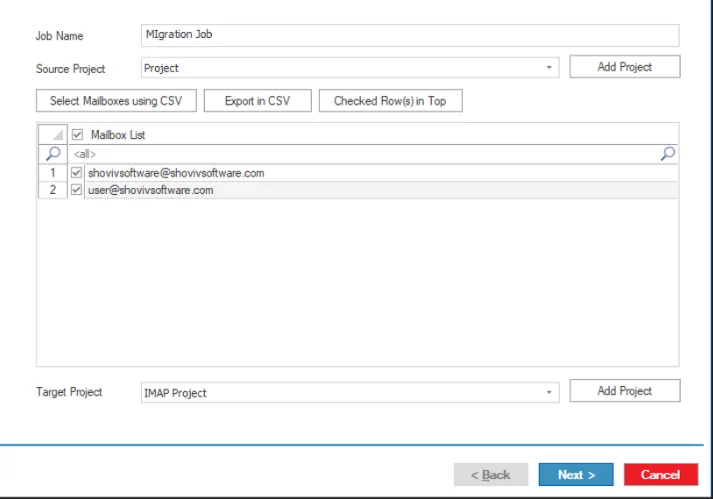
This tool works on a job-based model, which enables end users to create and run multiple migration tasks at the same time in a hassle-free manner. Moreover, users can add multiple mailboxes within a single job.

Incremental migration

Delta Migration

The incremental migration (delta migration) facility resumes the migration task from the halt point to avoid the duplication of items. This feature operates only on the untouched, failed items and recently modified data.

data integrity

Data Integrity Preservation

Shoviv Amazon WorkMail to IMAP Migration tool provides a secure environment for the migration task with MFA authentication and an end-to-end encryption model. In short, users get the exact copy of the source data in the target platform.

Highlighted Features of Shoviv Amazon WorkMail to IMAP Migration Software

Automated Migration Process

Automate the Migration Task

Users can automate the AWS WorkMail to IMAP migration task with the help of the scheduler feature, which enables users to schedule the tasks at their preferred time on the basis of daily, monthly, hourly, and weekly schedules.

Custom Data Selection

Selective Migration

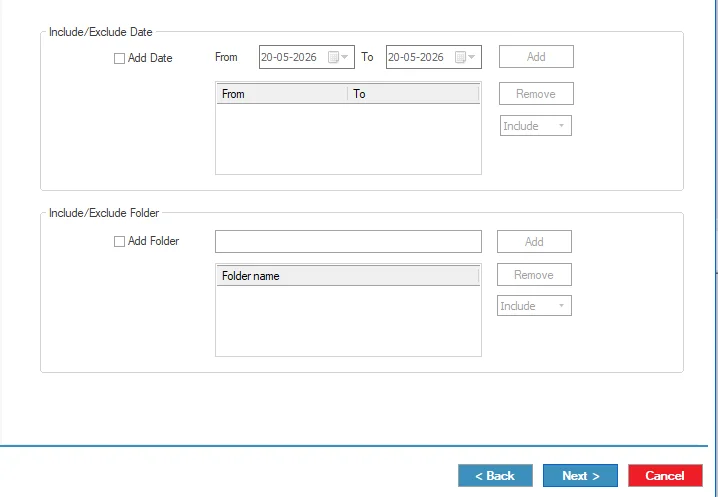
The tool allows users to obtain the specific outcome of the migration task on the basis of user-centric advanced filtering options such as date and folder extension. It ensures that users get the specific result of the migration task.

Multi-Thread Processing

Thread Count

The thread and item thread count feature allows users to configure the number of mailboxes, threads, and items processed at a time, improving migration performance. By increasing the thread count, multiple tasks can run at the same time, helping large mailbox operations complete faster and more securely.

Migration Preview Option

Preview Facility

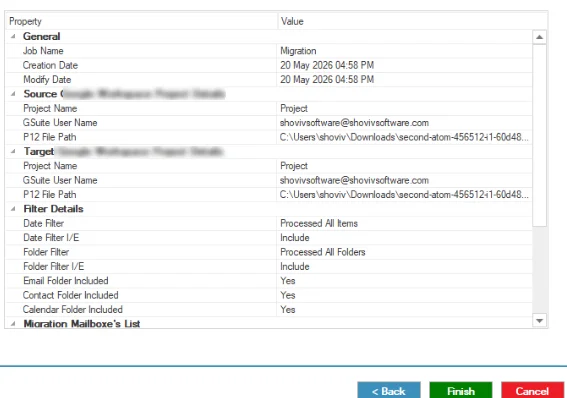
The software allows users to preview the selected job settings and details before starting the process. If any modifications are required, users can go back and make changes using the Back option. Once all settings are confirmed, they can proceed by clicking the Finish button to complete the process.

Detailed Migration Report

Job Report

The Shoviv Amazon WorkMail to IMAP Migration software provides a detailed report that helps users to monitor and verify migration activities. Users can review important information such as the target folder, total items, exported items, filtered items, already exported items, and the current job status. The report details can also be saved for further reference and tracking.

Failed Item Tracking

Bad Item Count

It also enables users to set a limit on the bad item count to prevent the migration task from getting stuck in the loop. This feature ensures that the migration process performance is not interrupted by migrating the failed items repeatedly.

Technical Specifications of Amazon WorkMail to IMAP Software

Software Overview Icon
Software Overview
Shoviv Amazon WorkMail to IMAP Migration
Version:
26.6
Release Date:
30th June 2026
Software Size:
43.2 MB
License Types:
Based on Number of Mailboxes
Update Frequency:
As required (compatibility-based)
Architecture:
32-bit & 64-bit
Activation Method:
Online & Offline License
Trial Version:
Yes (Process first 50 items per folder for free)
Computer Icon
System Requirement
Processor:
Minimum 1.0 GHz (2.0 GHz recommended)
Memory (RAM):
Minimum 4 GB
Hard Disk Space:
Minimum 512 MB free space
Windows Icon
Supported Platforms
Windows Operating Systems
Desktop:
Windows 7 / 8 / 8.1 / 10 (32-bit & 64-bit)
Windows 11 (64-bit)
Server:
Windows Server 2008 / 2012 R2 / 2016 / 2019 / 2022 / 2025
Virtual Icon
Virtual Environment
VMware® vSphere:
(including ESXi 9.x / 8.x / 7.x / 6.x)
VMware® Workstation Pro:
(All supported versions for Windows)
Microsoft® Hyper-V:
(Windows Server & Windows 11 / 10)
Oracle® VirtualBox:
(All supported versions)

Frequently Asked Questions

Shoviv Amazon WorkMail to IMAP Migration supports Windows 11, 10, 8/8.1/7, and all the latest versions of Windows operating systems.

The demo version allows migration of a limited number of emails per folder (the first 50 emails from Amazon WorkMail to IMAP servers). The licensed version removes all restrictions and supports complete mailbox migration.

Yes. Users can preview AWS mailbox data before initiating the migration to an IMAP server.

Yes, this tool enables users to control the migration process with user-centric advanced settings such as thread count. Retry attempts, and more.

It helps maintain the stability of the migration process by managing connection response time and reducing interrupts caused by slow network conditions or temporary server delays.

clean
clean-download
mcafee-secure
moneyback