
Summary – Looking to migrate Rackspace Email to Microsoft 365? This comprehensive guide walks you through simple, step-by-step methods—both manual and automated—to transfer your Rackspace mailbox smoothly and securely. Whether upgrading to a more reliable platform or managing business email migration, this blog provides all the essential details to help you complete the process efficiently.
Rackspace is a reliable cloud-based email and hosting platform that offers secure, business-class communication with features like spam protection. IMAP access, and mobile synchronization for emails, calendars, and contacts across iOS, Android, and Windows devices. It also provides collaboration tools, 30GB of file storage, and easy accessibility for Windows and Mac users.
On the other hand, Microsoft 365 (formerly Office 365) is a leading cloud-based Software as a Service (SaaS) platform that delivers powerful productivity and collaboration tools, including Outlook, OneDrive, Teams, SharePoint, and Office applications like Word, Excel, and PowerPoint. In various plans for individuals, businesses, and education, Microsoft 365 ensures seamless integration, accessibility, and enhanced productivity from anywhere.
Before diving into the migration steps, let’s explore the key advantages of migrating your Rackspace email to Microsoft 365 account and understand why it has become the preferred choice for businesses and professionals.
Reasons to Migrate Rackspace Emails to Microsoft 365
Many individuals and organizations are switching from Rackspace to Microsoft 365 due to its advanced features, robust security, and seamless integration. Below are the key reasons why users choose Microsoft 365 over Rackspace:
- Microsoft 365 provides an all-in-one solution with Word, Excel, PowerPoint, Outlook, OneDrive, Teams, and SharePoint—far beyond Rackspace’s primary email services.
- Deep integration with Microsoft’s ecosystem (Azure, Windows, and other Office apps) enables smoother workflows and better collaboration.
- Microsoft 365 offers enterprise-grade protection with advanced security features, data encryption, and compliance tools to safeguard user data.
- Frequent updates and new features ensure users have access to the latest tools, keeping productivity and security up to date.
- Integrated tools like Teams, OneDrive, and SharePoint make real-time communication and teamwork more effective and organized.
- Microsoft 365 provides a range of scalable plans for individuals, small businesses, and large enterprises, enabling easy customization to support organizational growth.
- With a familiar and intuitive interface, Microsoft 365 ensures an effortless transition for users, making navigation and management simple.
From the above points, it’s clear why most users are switching to Microsoft 365. Next, let’s move on to how to perform the migration smoothly.
Pre-Migration Steps Before Moving from Rackspace to Microsoft 365 Manually
- Set Up Admin Access: Create an admin account in Rackspace and Microsoft 365 with full mailbox permissions.
- Take a Backup: Back up all critical Rackspace data to prevent accidental loss.
- Unhide All Objects: Ensure all mailboxes, distribution lists, and hidden items are visible.
- Collect Essential Details: Gather credentials, user account, passwords, and Rackspace server details.
- Check Internet Connectivity: Maintain a strong and stable internet connection for smooth data transfer.
- Clean Unnecessary Data: Remove duplicate or unimportant mailbox items before migration.
- Choose the Right Office 365 Plan: Select and purchase the appropriate Microsoft 365 plan for your organization’s needs.
- Create and License Users: Add users in Microsoft 365 and assign valid licenses to each.
- Prepare Users: Educate users about Microsoft 365 basics for Quick adoption after migration.
Once these pre-migration steps are complete, you can proceed to migrate Rackspace email to Microsoft 365.
Challenges of the Manual Migration Approach
Before performing the manual migration, it’s essential to understand its limitations. As in the above section of Pre-Migration Steps, according to those checklists, we have clearly seen that the process can be challenging, lengthy, and time-consuming, often requiring multiple configurations and constant supervision. Some steps are complex and may not be suitable for users without advanced technical knowledge.
Moreover, manual methods often carry a higher risk of errors, incomplete transfer, or data loss during execution, especially when dealing with large mailboxes or multiple accounts. Given these challenges, relying solely on manual migration may not be the most efficient or secure approach.
But don’t worry — there’s a better way. You can simplify the entire process using a professional and automated tool to migrate Rackspace email to Microsoft 365 quickly, safely, and accurately.
Professional Solution to Migrate Rackspace Email to Microsoft 365
Instead of struggling with complicated manual steps, you can choose a simple and more reliable approach. According to expert evaluations, Shoviv IMAP to Office 365 Migration Tool stands out as the top-rated solution in its category. Offering comprehensive features in one plan with 24/7 technical support has become a preferred choice for many users. The tool seamlessly migrates multiple email accounts from any IMAP email service to Microsoft 365, such as emails from Rackspace to Office 365.
This professional migration tool offers a faster, safer, and more efficient way to migrate data from Rackspace to Microsoft 365 accounts. It minimizes human errors, ensures data integrity, and saves valuable time and effort—making the entire migration process smooth and hassle-free.
Some key features of Shoviv IMAP to Office 365 Migration Tool:
- Support bulk mailbox migration from multiple Rackspace accounts.
- Includes filters and mapping to migrate only selected data.
- Other than Rackspace, it can migrate from any IMAP-enabled email client like Gmail, Zoho, Yahoo !Mail, etc.
- This utility is boosted with the incremental migration facility that helps to prevent the duplicity in the target.
- Generate detailed reports for every migration step.
- Offers data integrity and encryption throughout the process.

Simple Steps to Migrate Rackspace Email to Microsoft 365 with Shoviv’s Tool:
- Install & Launch: Open the Shoviv IMAP to Office 365 Migration Tool.
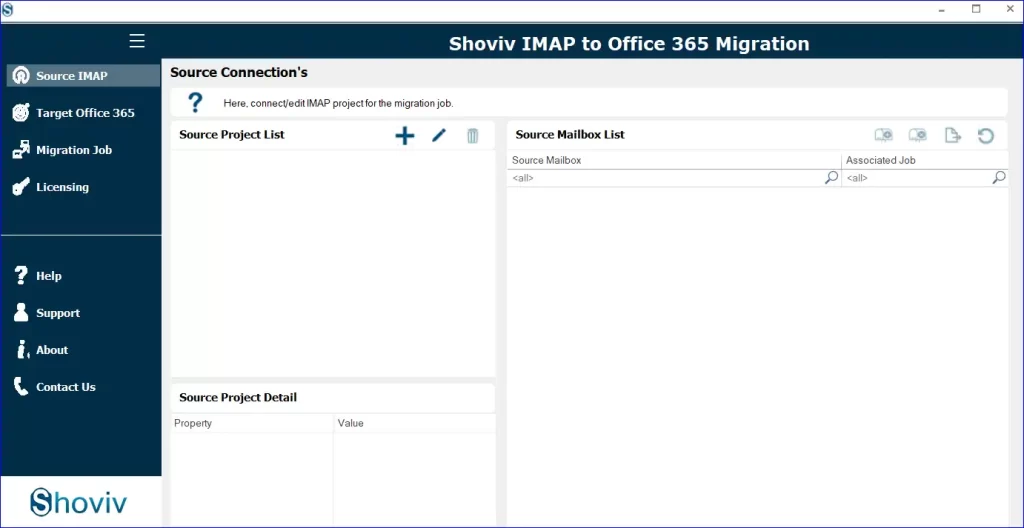
- Add Source: Connect your Rackspace IMAP account under the Source IMAP tab.
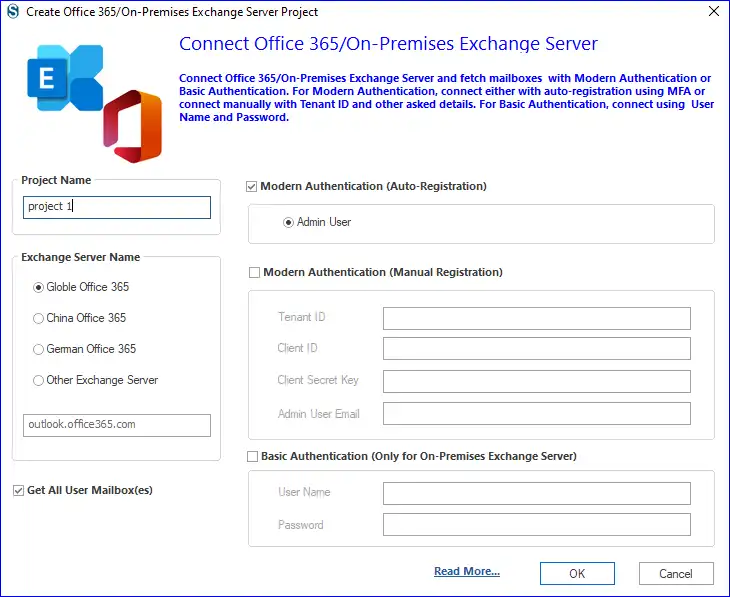
- Add Target: Connect your Microsoft 365 account under the Target Office 365 tab.
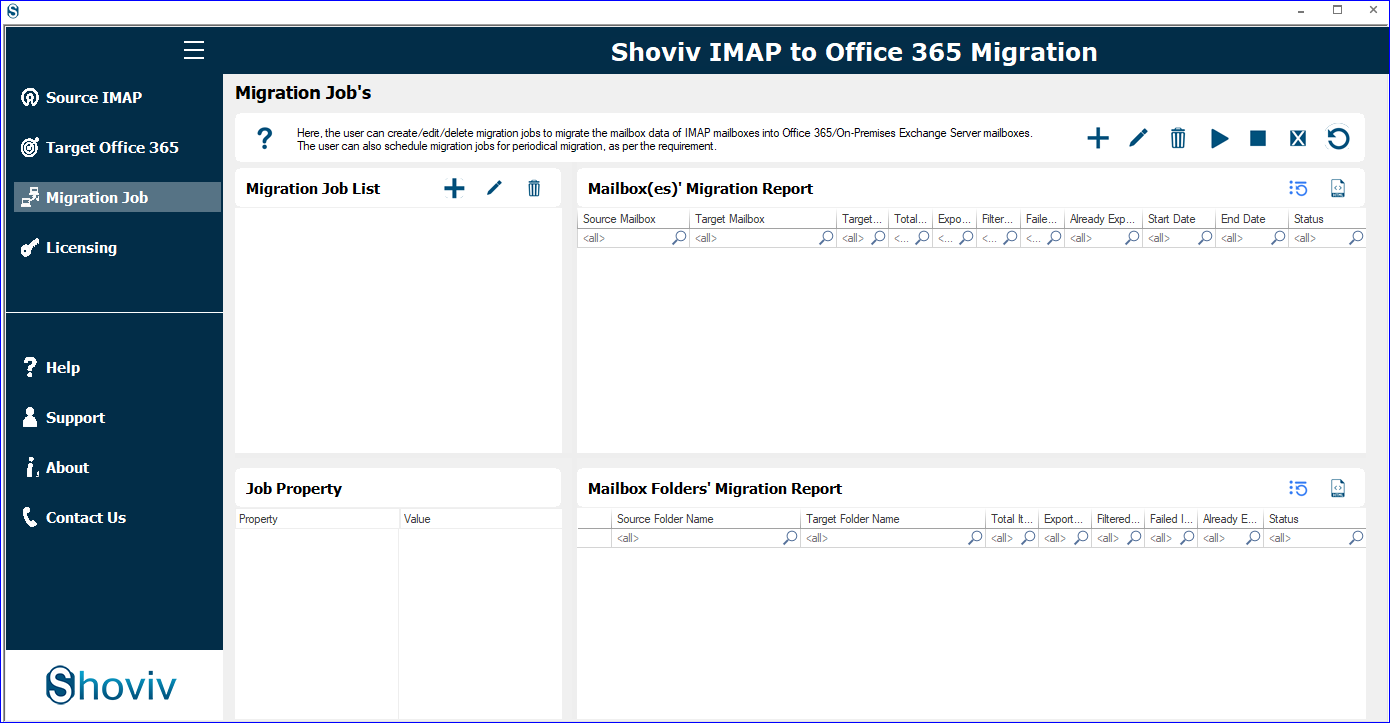
- Create Migration Job: Add a new job, select your source and target mailboxes, and map them.
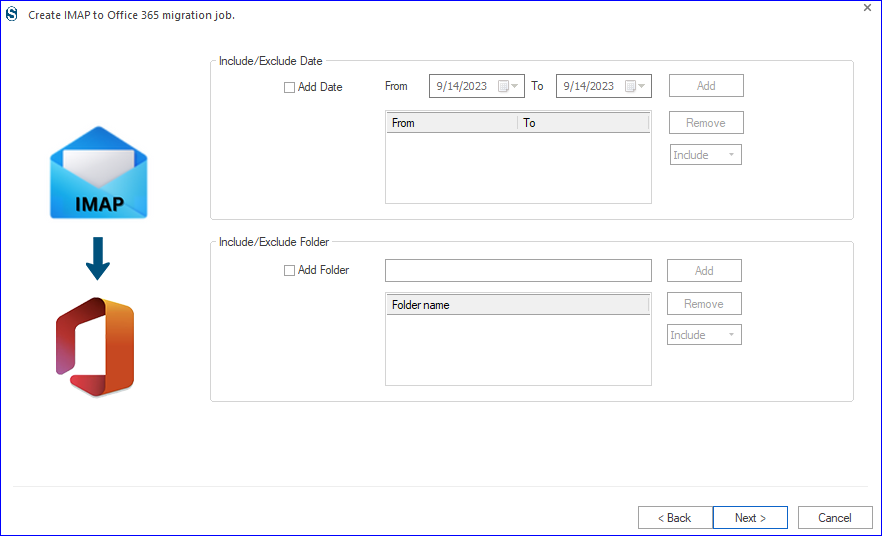
- Apply Filters: Choose date ranges or folders to include/exclude specific emails.
- Adjust Settings: Configure thread counts, retry attempts, and job scheduling.
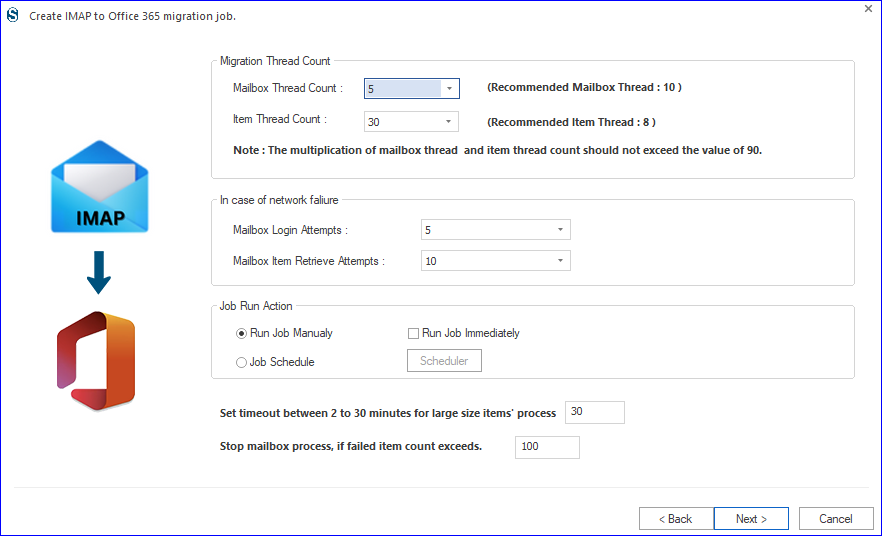
- Preview & Start Migration: Review your job configuration and initiate migration.
- Generate Report: View and export detailed migration reports for verification.
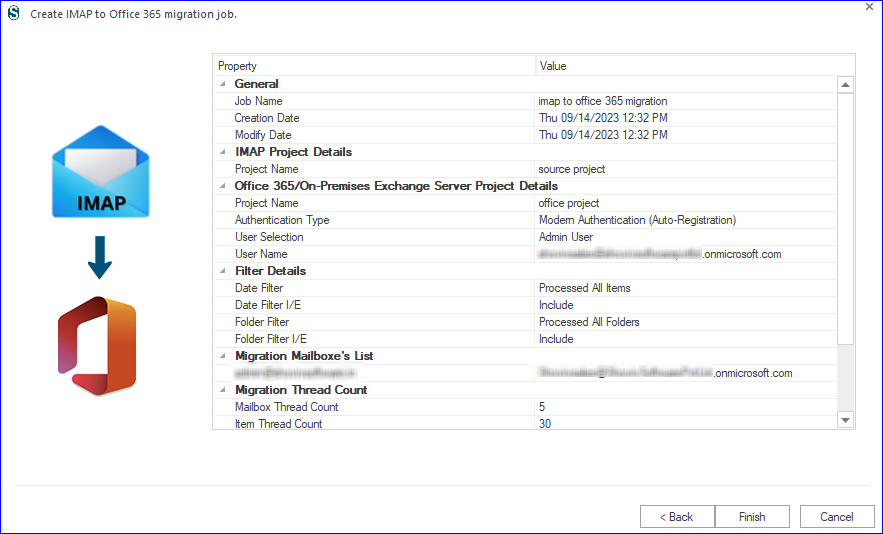
This automated method ensures a complete and secure migration—minimizing downtime and human error.
Gist of The Blog:
Migrating from Rackspace to Microsoft 365 is a smart step toward enhanced productivity and collaboration. The manual approach may work for small-scale moves, but it is complex and risky for larger data volumes. Alternatively, a professional approach with Shoviv IMAP to Office 365 Migration Tool offers an efficient, secure, and user-friendly way to migrate mailboxes with zero data loss.
Moreover, users can try the free demo version of this tool before purchasing it. For further inquiry, contact our assistant team.
Frequently Asked Questions:-
Yes. The tool allows the selective migration of single or multiple data points according to your requirements.
It depends on the mailbox size and the internet speed. However, the automated tool accelerates the process significantly.
Absolutely. The tool uses end-to-end encryption and doesn’t store user credentials, ensuring complete data security.
The demo version allows users to migrate up to 50 items per folder for evaluation. For unrestricted access, users need to assign a license