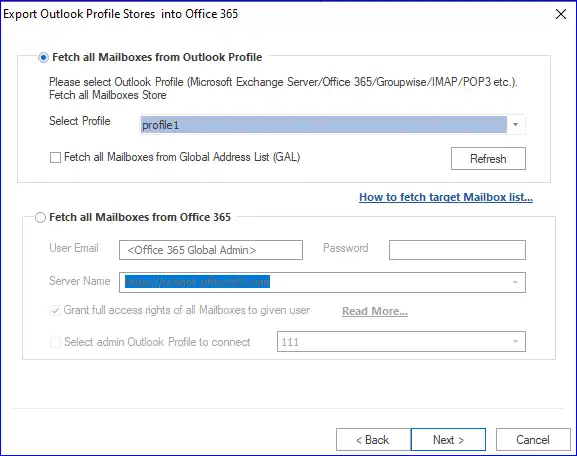
Method 1: Fetch Exchange Server Mailbox list: -
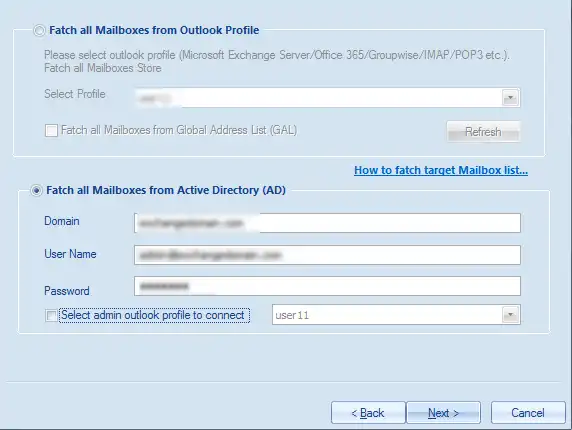
Fetch the target On-Premises Exchange Server (On-premises Exchange) mailboxes. Please provide the asked details to execute the process.
- Domain name: - Enter the Server Name or IP address of domain server where your Active Directory (AD) is installed.
- User Name: - Enter the Username of the user who has administrative rights. Exchange Mailbox must be created.
- Password: - Enter the Password of the respective AD administrative user.
After providing all the values, click on the Next button, if you get any error here, please ensure that with given user name there is a mailbox in Exchange or you can choose another option “Select admin Outlook Profile to connect” option.
- Select admin Outlook Profile to connect: - Select the Outlook Profile of the admin user and clickon the Next button.
- If you are still getting the error message, it is recommended that please create Outlook Profile of the admin user of Exchange, make sure to make it online (disable cache) and use “Fetch all Mailboxes from Outlook Profile” option.(refer method 3)
- Fetch all mailboxes from Global Address List (GAL): - It isto fetch theuser list of mailboxes using Global Address List.
Method 2: Fetch Office365 Mailbox list: -
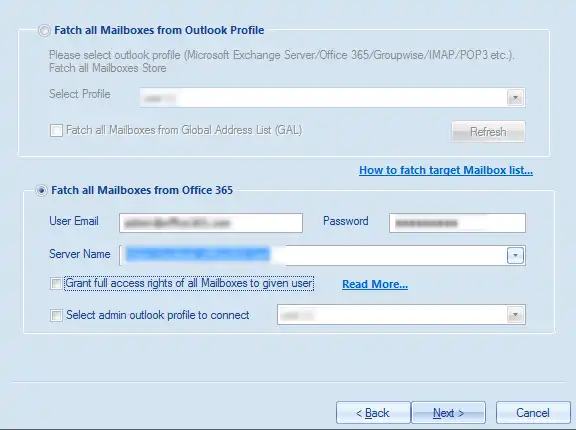
Fetch the target Office365(Online Exchange Server) mailboxes. Please provide the asked details to execute the process.
- User Email: - Enter Global admin user email of Office 365.
- Password: - Enter the password of the respective user.
- Server Name: - Provide the Server Name of Office 365 (If not specified please leave it default).
- Grant full access rights: - It is to grant full access permission of the user mailboxes to the admin user (Read More…)
If you get any error here, please ensure that with given user name there is mailbox in Office 365 or check “Select admin Outlook Profile to connect” option.
Select admin Outlook Profile to connect: - Select the Outlook Profile of the global admin user of Office 365 and click the Next button.
- If you are still getting the error message, it is recommended that please create Outlook Profile of the admin user of Office 365, make sure to make it online (disable cache) and use “Fetch all Mailboxes from Outlook Profile” option.(refer method 3)
Method 3: Fetch all Mailboxes from Outlook Profile(Use if MFA is enabled): -
- Select Outlook Profile of Exchange Server, Office 365 or MAPI Client. If you don’t have Outlook Profile, please create Outlook Profile from Control Panel, make sure to make it online (disable cache)
- Please make sure the delegate rights are given to all the attached user mailboxes.