
Are you also a Gmail user or planning to switch your email platform to Gmail but want to know more about its email services? If yes is your answer, then read this informative blog until the end.
Gmail, a popular web-based email service by Google, allows users to send and receive messages and files across various platforms like Windows and Android, with standout features like massive data storage capacity in the gigabytes for writing, sending, receiving, and managing your messages easily.
Some Advanced Features Offered by Gmail Platform:
- It offers tools such as advanced filtering, seamless syncing, robust spam protection, email reminders, integrated virus protection, scheduling features, and recurring email functionality.
- Users can program their emails to dispatch at any chosen moment.
- With Gmail, you get sync support every hour, all day long.
- Gmail lets you personalize your inbox with various themes and colour choices.
- Gmail offers a range of third-party extensions that enhance its functionality, from scheduling messages to tracking their delivery.
- It provides a free online email service that allows users to manage messages using IMAP and POP connections via its website or external apps.
- Gmail outshines its robust spam filters, virus protection, and other advanced security features.
- When you sign up for Gmail, you get a distinctive Google account with an email ID that always ends in @gmail.com.
Make Your Personal Gmail Backup Easy
Backup Your Personal Gmail Emails With Shoviv Gmail Backup Tool.
Does Google provide different versions of its widely used Gmail service?
Google Mail, simply known as Gmail, is one of Google’s standout products. It provides a versatile email service suitable for both personal and business needs. Known for its strong capabilities, it’s a popular free email client that provides functions that competitors usually charge for.
An Overview of Personal and Business Gmail
Personal Gmail – For daily emails, many rely on the free convenience of a personal Gmail account. It effectively integrates with other Google products, like in-email chat and Google Drive, providing a streamlined user experience. With options like email scheduling and various qualities of life enhancements, it stands out as a top pick for personal use, offering a sense of ease and comfort.
Business Gmail – Alternatively, Gmail for business is built for companies and professionals, offering advanced features and customizations to support business operations. Tailored for teamwork, it delivers the customization, integration, security, and storage needed for effective business collaboration, empowering users with professional tools and features.
To grasp the difference between personal and business Gmail, we must explore what each one does. Let’s uncover the intriguing distinction between personal Gmail and Gmail for business, also known as Google Workspace. This article will provide a comprehensive comparison, informing you about the significant contrast between these two versions.
Also Read: How to Migrate Email to Google Workspace Effortlessly?
What is the difference between Personal and Business Gmail?
| Personal Gmail | Business Gmail |
|---|---|
| Free account for individual use. | Paid account designed for the business and organizations. |
| Uses the format yourname@gmail.com. | Uses custom domains, such as support@yourcompany.com |
| Includes basic Gmail features such as email, Google Drive, Google Meet, and Google Calendar. | Includes additional business tools like Google Meet with higher participant limits, Google Chat, shared calendars, advanced security and compliance features, and business-grade support. |
| Emails are sent from @gmail.com domain, with no customization. | Allows for a customized email domain, branding, and company logos. |
| Standard security features like two-factor authentication (2FA) and spam protection. | Advanced security features, such as endpoint management, data loss prevention (DLP), and advanced phishing protection. |
| Offer 15GB of shared storage across Gmail, Google Photos, and Google Drive. | Offers higher storage options depending on plan, starting at 30GB per user and going up to unlimited storage for higher-tier plans. |
| Limited to help forums and self-service support. | 24/7 support via phone, email, and chat, with different response times based on the subscription plan. |
| Intuitive admin console is missing. | Centralized admin console for user management, setting permissions, and monitoring activities. |
Why do I need to choose Business Gmail over Personal?
Google Workspace provides all the essential productivity tools an office could need. Still confused? Let’s discover the benefits of choosing Business Gmail over Personal Gmail in detail and find out which one suits your needs best.
Account Design & Purpose
- Personal Gmail: Designed for individual, non-commercial use. Account ownership is solely with the individual user and is off-limits to employers.
- Business Gmail (Google Workspace): Crafted for business efficiency. Provides tailored email domains, personalized branding, and custom company logos. Employers have complete management control over accounts.
Email Address
- Personal Gmail: Uses the standard yourname@gmail.com format.
- Business Gmail: Allows communal email addresses (e.g., support@company.com) and uses your company’s domain. Offers quick, one-click group access and file sharing updates, unlike the personal version where each recipient must be added individually.
Team Management & Collaboration
- Personal Gmail: Lacks effective teamwork features and restricts file sharing to single recipients.
- Business Gmail (Google Workspace): Enables a professional email address using your own domain. Easily hosts large meetings (100+ attendees), overcoming the typical cap in the free version of Google Meet.
Access & Admin Control
- Personal Gmail: Lacks unified management.
- Business Gmail: Offers an Admin Console, allowing an assigned administrator to effortlessly oversee and manage all user accounts, regulate company data, and control access permissions (adding or removing members).
Brand Consistency
- Business Email: Essential for brand consistency and higher conversions. Using a personal email for business follow-ups can confuse customers and lower the chances of closing a deal.
Storage Capacity
- Personal Gmail (Standard Plan): Offers a standard 15GB of storage at no cost.
- Business Gmail (Google Workspace): Storage options vary from 30GB to 5TB, depending on the subscription plan, providing a substantial advantage for business files (documents, PDFs, etc.).
Enhanced Security Features
- Business Gmail (Upgrade): Provides expanded storage, robust security, and premium tools, including advanced encryption and two-factor authentication.
Customer Support
- Personal Gmail: Offers basic support.
- Business Gmail: Offers superior 24/7 technical support via phone or chat for admins. Customers who sign up through an authorized reseller may gain additional benefits like local language support and a dedicated portal.
How to create a Gmail account for business purposes?
Setting up Gmail for business is easier when your domain is ready beforehand. Whether it’s a domain you already have or one you intend to purchase from Google, you’ll need it to create your account. Let’s create a customized business Gmail using Google Workspace. Below, we have mentioned a few simple steps. Just follow them:
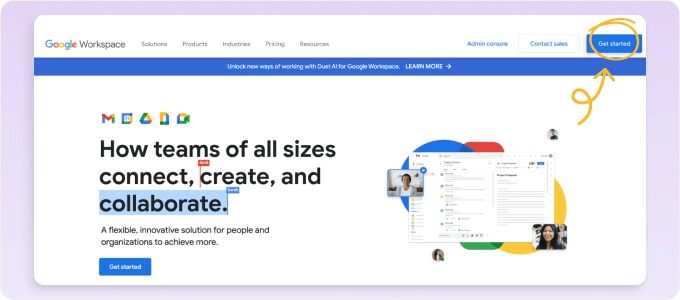
- Visit workspace.google.com and select ‘Get started’ to begin.
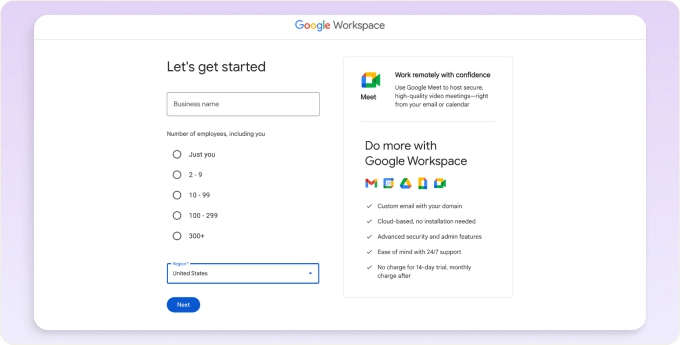
- Share your business details, including business name, team members, and country.
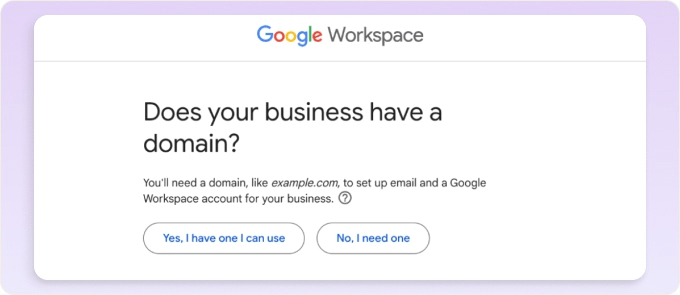
- Let us know if you own a domain name like yourbusiness.com.
- Connect your existing domain, or search for a new one to purchase if you don’t have one yet.
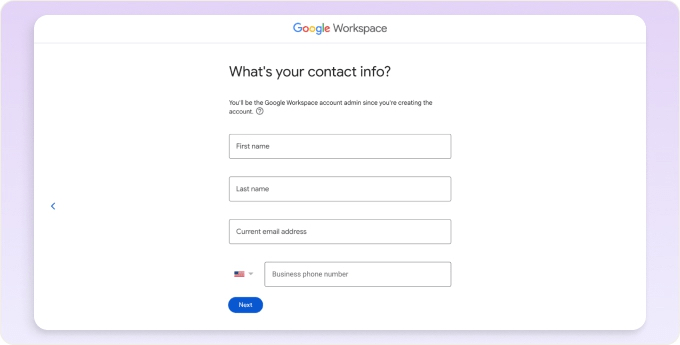
- Provide your contact info, including location.
- Pick your login name or user ID and password.
- Choose a plan and finish your checkout process.
After setting up your business email with Google Workspace, personalize your signature and integrations like DocuSign or Calendly to boost your business efficiency.
Also Read: How to Create & Use Google Workspace Email Aliases?
Who should opt for Personal Gmail and Business Gmail?
While there is no doubt both personal and business Gmail accounts are cloud-based email solutions, the question is, which one should you opt for? Choosing between personal and business Gmail hinges on your individual needs and preferences. Here’s top-3 breakdown:
1. Gmail for Personal Use
- Personal Gmail is perfect for a simple, easy-to-use, and cost-free email solution.
- It offers vital functionalities, browser extensions, and 15Gb free cloud storage.
- For freelancers starting, Gmail is ideal; it’s free, reliable, and covers all your basic brand needs without the extra cost of advanced features.
2. Gmail for Small Business Use
- The Business Starter plan in Google Workspace is ideal for small teams of up to 10 members.
- Benefit from advanced support simplified IT management, and an affordable monthly fee of only $6 per user.
- The business standard plan boosts support, expands storage, and elevates Google app performance, making it perfect for growing businesses.
3. Gmail for Large Business Use
- Google Workspace’s Enterprise plan is a game-changer for large-scale businesses.
- This option provides bespoke solutions, a committed account manager, robust security, and various extras.
- If your organization needs comprehensive solutions and enhanced support, consider the Enterprise plan.
Wrapping Up:
This blog has explained the different dimensions of Gmail: one is Personal Gmail, and another is Business Gmail. Knowing the difference between personal Gmail and Gmail for business (Google Workspace) helps you choose the right email solution for your needs. Your productivity choice is guided by how you use your email account. Gmail is an excellent choice for a free email client for everyday personal use. Still, for a complete productivity suite, the business version provides custom features ideal for professional and organizational needs. Selecting between Personal Gmail and Business Gmail depends on your specific requirements. Each service presents its advantages and drawbacks.
Frequently Asked Questions
Ans. While you can use a personal Gmail account, it’s not the best idea. Individual accounts can quickly hit their limits, so it’s wiser to begin with Gmail for business.
Ans. For clear communication, having a separate Gmail account for business is smart, so your inbox stays clutter-free. Keep your business accounts separate to optimize costs and only pay for the Google Workspace premium features you genuinely need.
Ans. You must set up a Google Workspace account to access Gmail for business. Starting at only INR 136.90 per user monthly (subject to change), you’ll get 30GB of cloud storage.


