Microsoft Exchange Server uses EDB (Exchange Database) files to store all mailbox data, including emails, contacts, tasks, journals, and attachments. These files save both in-process and non-SMTP messages, playing a vital role in organisational communication. However, Exchange servers are susceptible to corruption due to viruses, crashes, or hardware failures. In such cases, having a backup of the EDB file becomes crucial for recovery.
While EDB files are excellent for enterprise-level management, they cannot be accessed directly outside of Exchange. On the other hand, EML files provide a lightweight, portable format compatible with clients such as Apple Mail, Thunderbird, and Windows Live Mail. Therefore, an efficient Exchange EDB to EML Converter becomes essential for data conversion, accessibility, and long-term archiving.
In this blog, you will be exploring the manual and professional methods to convert Exchange EDB files to EML format easily and securely. So, let’s proceed further to understand how you can perform the conversion efficiently and achieve accurate results. But before diving into the methods, here’s a quick look at why exporting EDB to EML can be highly beneficial for users and organisations alike.
Reasons to Convert EDB to EML Format:
- Enhances data compatibility and portability across different platforms and clients.
- Ensures offline accessibility without relying on Exchange Server.
- Provides a standardised and flexible email format for archiving and compliance.
- Simplifies conversion between different mail systems or servers.
- Minimises dependency on Exchange, ensuring data persistence and long-term availability.
- Helps in reducing storage and maintenance costs for email data.
These reasons highlight the importance of converting EDB files into EML. Now that you understand the reasons behind the conversion, let’s move on to the methods for performing it successfully.
Manual Methods to Convert EDB to EML
There are no direct built-in options in Microsoft Exchange to export EDB files as EML. However, two manual approaches can be used to accomplish this task:
Method 1: Convert Exchange EDB to EML via Outlook & IMAP Configuration
- Connect EDB Mailbox to Outlook
Mount the Exchange EDB mailbox to MS Outlook by syncing with the live Exchange account.
- Set Up an IMAP Account
Configure an IMAP-enabled account (such as Gmail or Thunderbird) in Outlook.
- Move Mailboxes
Copy or move mailbox items from the Exchange account to the IMAP folder.
- Sync with Thunderbird
Open Thunderbird and connect it with the same IMAP account. Once the synchronization is done, all mailbox data will appear in Thunderbird.
- Export as EML
Select the desired emails in Thunderbird, right-click, and choose Save As > EML to export messages individually.
Method 2: Two-Way Conversion Using PST Export
- Use PowerShell commands or the Exchange Admin Center (EAC) to export the Exchange mailbox to a PST file.
- Import the exported PST into MS Outlook.
- From Outlook, open the OST file and save individual emails as EML files using the ‘Save As’
These two manual approaches are helpful for small mailboxes and low-volume migrations.
Limitations of Manual Methods:
Although the above methods work, they have several drawbacks:
- Requires technical expertise and is time-consuming.
- Not suitable for large EDB mailboxes or bulk conversions.
- High risk of data loss or alteration during export or syncing.
- Ineffective if the EDB files are corrupted or inaccessible.
- Manual synchronization may lead to incomplete data transfer.
To overcome these challenges, professionals often prefer an automated and secure solution that ensures accuracy and efficiency.
Automated Tool to Convert Exchange EDB to EML Files in Bulk
The most efficient and reliable way to convert Exchange EDB files to EML format is by using the Shoviv EDB to EML Converter. This advanced tool automates the process, offering fast, accurate, and bulk-level conversions with minimal effort.
Key Features of Shoviv EDB to EML Converter
- Shoviv EDB to EML Conversion Tool exports multiple EDB files simultaneously in one go.
- Exports EDB data to PST, EML, MSG, vCard, HTML, RTF, vCal, and more.
- Capable of recovering corrupted or inaccessible EDB files
- Supports adding multiple EDB files of any size for batch processing.
- Maintain data integrity and folder hierarchy throughout the process.
- Provides a preview of mailbox items before conversion.
- Shoviv EDB to EML Converter allows export of Office 365 or another Exchange Server.
- Compatible with all Microsoft Exchange Server and Windows OS editions.
- Offers an option to exclude already processed items to prevent duplication.
Steps to Convert Exchange EDB Files to EML Format Using Shoviv:
- Install and launch the Shoviv EDB to EML Converter.
- Add EDB Files that you want to convert.
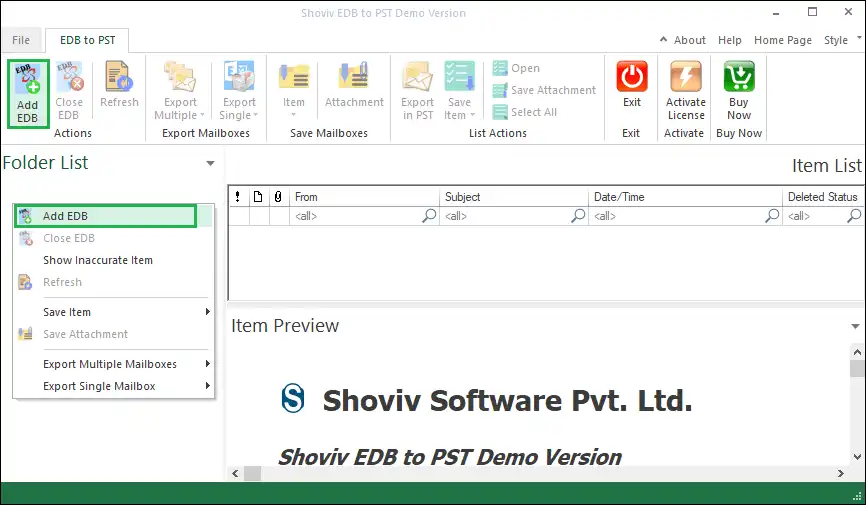
- From the ribbon bar, choose Outlook EML as the export option.

- Select folders to include, browse the target location, and apply necessary filters.

- You can also apply the filters as per the need.

- Click Next to begin the conversion process. The tool will export EDB data to EML efficiently.

The automated method ensures complete accuracy and preserves data integrity while saving significant time and effort.
Conclusion:
This blog discusses detailed ways to convert Exchange EDB files to EML format. While manual methods like IMAP configuration and EML export can work for limited data, they are complex, risky, and time-consuming. On the other hand, professional tools such as the Shoviv EDB to EML Converter provide a seamless and secure way to perform bulk conversions while maintaining the original structure and integrity of your data.
So, whether you are looking for recovery, conversion, or accessibility, using an expert solution speeds up, improves accuracy, and provides peace of mind during the EDB to EML conversion process.
Frequently Asked Questions:
You can use IMAP synchronization or the PST export method. However, these manual methods are complex and suitable for small mailboxes only.
The Shoviv EDB to PST/EML Converter is highly recommended as it supports both healthy and corrupted EDB files and ensures 100% data integrity.
Yes. The automated tool includes a preview panel that lets you view mailbox data before performing the conversion.
Use the Shoviv EDB to EML Converter, which allows selective export of folders or items even if the Exchange Server is offline.
Yes, the Shoviv EDB to PST Converter can directly save files in EML format without relying on Outlook.
Yes, the advanced automated converter supports batch processing, allowing multiple EDB files to be converted simultaneously.