

“SharePoint empowers organizations with content management, security, and collaboration. But it is the SharePoint Farm that transforms these capabilities into a powerful system that runs smoothly.”
Today’s era is highly competitive, especially for businesses and organizations with many operations. To stay competitive, organizations must choose the best technologies to manage their data and processes efficiently. Many organizations rely on Microsoft SharePoint because it provides storage, security, and organized content management along with many other features that help manage data efficiently.
However, the question is: How is SharePoint managed effectively?
The answer lies in the SharePoint Farm. In this blog, we will take a deeper look at this concept.
What is a SharePoint Farm?
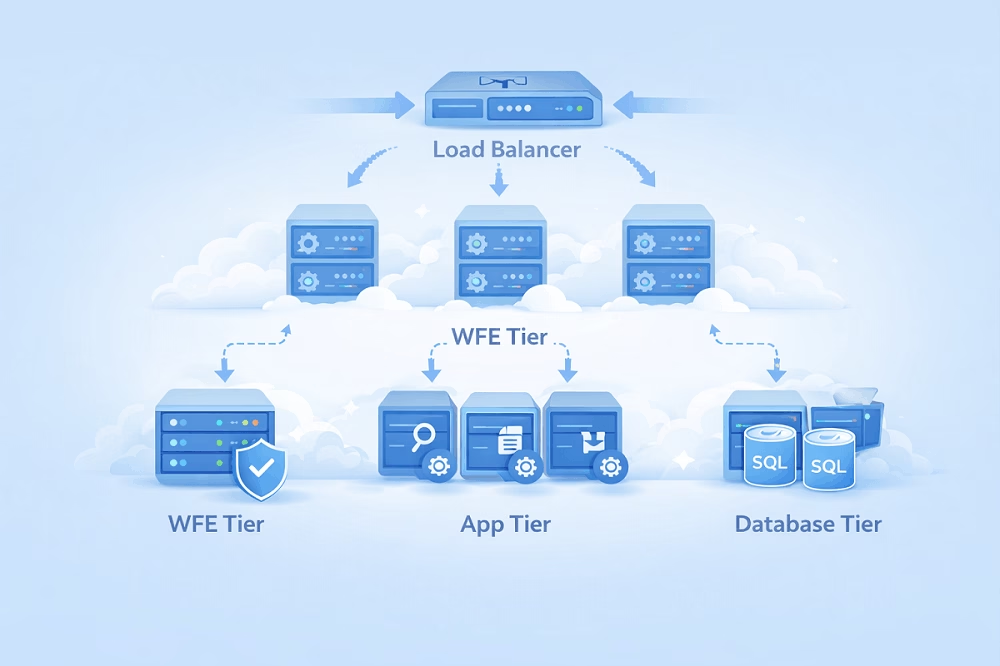
In simple terms, a SharePoint Farm is a collection of one or more servers that work together to run the SharePoint platform.
Each server in the farm has a specific role, such as:
- Hosting websites
- Handling background services
- Running search operations
- Storing data in a central database
All these servers are connected to a single configuration database, usually managed through Microsoft SQL Server.
Why Do We Need to Understand a SharePoint Farm?
Understanding a SharePoint Farm means understanding how SharePoint works behind the scenes. This knowledge is essential for maintaining performance, stability, and long-term success.
Key Reasons
- Efficient management of the entire SharePoint environment
- Helps in planning and designing the right architecture
- Improves troubleshooting of issues
- Enhances performance and reliability
- Supports better security and compliance
- Helps SharePoint administrators manage the platform effectively
- Assists during SharePoint backup, migration and expansion
SharePoint Farm Server Types:
SharePoint uses different types of servers to improve performance, scalability, and reliability. These server types may vary depending on the version of SharePoint being used, such as SharePoint 2010, SharePoint 2013, SharePoint 2016, or SharePoint 2019.
Traditional Server Types (SharePoint 2010 / 2013)
These versions mainly use four types of servers:
- Web Servers
These servers handle user requests and display pages, lists, and document libraries.
- Application Servers
These servers provide backend services, handle heavy operations, and host service applications.
- Search Servers
These servers perform search crawling, indexing, and query processing.
- Database Servers (SQL)
These servers store SharePoint data and are typically configured using SQL clustering or Always On availability groups.
MinRole Server Types (SharePoint 2016–2019)
Later versions introduced the MinRole architecture, which assigns specific roles to servers.
- Front-End
Hosts front-end web pages and handles user requests.
- Application
Runs heavy background services and scheduled jobs based on user needs.
- Distributed Cache
Stores temporary data to improve performance and speed.
- Search
Handles search crawling, indexing, and query processing.
- Custom
Allows administrators to manually assign services based on specific requirements.
Types of SharePoint Farms
Single vs Multiple SharePoint Farms
A Single Farm is a complete environment where all servers work together as a team. It is easier to manage and is usually suitable for small to medium-sized organizations.
On the other hand, a Multiple Farm setup consists of two or more farms designed for different purposes. This setup provides better performance, improved security, and greater isolation, making it ideal for large organizations.
Use Cases of Single and Multiple Farms
Single Farm
- Suitable for small teams
- Requires limited storage
- Supports fewer applications
- Easier to manage and maintain
Multiple Farms
- Suitable for large organizations with heavy workloads
- Distributes workloads across environments
- Provides separate environments such as development, testing, and production
- Offers better scalability and security
Content Farm
A Content Farm is dedicated to hosting and managing SharePoint content such as:
- Sites
- Site collections
- Intranets
- Document libraries
It typically focuses on content storage and management rather than running heavy service applications.
Use Cases
- Used in large or enterprise-level deployments
- Easy to scale as the organization grows
- Can connect with a shared service farm
- Provides faster service access for end users
- Efficiently stores and serves organizational content
Preparing Your SharePoint Farm for the 2026 End of Life Deadline
When we talk about the SharePoint End of Life (EOL), we are specifically looking at the sunsetting of the classic “Fixed Lifecycle” servers. For anyone managing a SharePoint Farm, July 14, 2026, is the most critical date on the calendar.
This marks the end of extended support for both SharePoint Server 2016 and SharePoint Server 2019. After this date, your farm infrastructure becomes a liability rather than an asset.
How EOL Affects Your SharePoint Farm
Running an EOL farm is like driving a car that the manufacturer no longer makes parts for—eventually, a breakdown becomes permanent.
1. Security Gap
Once a farm reaches EOL, Microsoft stops releasing Security Intelligence Updates. If a new vulnerability is discovered in the SharePoint code (a “zero-day”), your servers will remain unpatched, making your farm a primary target for ransomware and data breaches.
2. Compliance & Legal Risks
For organizations in regulated sectors (Finance, Healthcare, Government), running unsupported software is often a direct violation of compliance standards like HIPAA, GDPR, or ISO 27001. This can lead to heavy fines or the loss of cybersecurity insurance coverage.
3. Functional Regression
Related technologies are also retiring. For instance, Office Online Server (OOS)—which allows you to view and edit docs in the browser—is set to retire in December 31, 2026. Without OOS, your SharePoint Farm loses its primary collaboration feature, forcing users to download every file to edit it.
4. End of Support
If your Farm’s SQL database corrupts or a Web Front End (WFE) fails due to a bug, Microsoft’s technical support teams will no longer assist you. You are entirely on your own.
Strategic Migration Paths for SharePoint Post-EOL
To avoid the 2026 “hard stop,” you have three main strategic paths.
Solution A: Migrate to SharePoint Online (Recommended)
This is the “Evergreen” solution. By moving your farm data to Microsoft 365, you eliminate the need to manage servers, patches, or EOL dates ever again.
Best for: Organizations wanting to reduce IT overhead and use AI features like Microsoft 365 Copilot.
Solution B: Move to SharePoint Server Subscription Edition (SPSE)
If you must keep your data on-premises for legal or “air-gapped” reasons, SPSE is the answer. It follows the Modern Lifecycle Policy, meaning it receives continuous updates rather than having a fixed 10-year death date.
Best for: High-security environments that require full control over hardware.
Solution C: The Hybrid Approach
Keep your sensitive “Cold Data” on a local farm (upgraded to SPSE) while moving active collaboration and “Hot Data” to SharePoint Online.
The Role of Shoviv SharePoint Migrator
Manually migrating an entire SharePoint farm is a high-risk process that often leads to data corruption and the loss of complex permission structures. The Shoviv SharePoint Migrator provides a secure, automated path to navigate the EOL transition by:
- Data Integrity: Eliminates the human error associated with manual “drag-and-drop” methods.
- Permission Mapping: Seamlessly migrate user access rights from your legacy farm to the new environment.
- Metadata Retention: Ensures “Created” and “Modified” dates remain intact for legal and audit compliance.
Conclusion:
In conclusion, understanding a SharePoint Farm is essential because it forms the backbone of the SharePoint environment. It helps organizations manage data effectively, improve performance, and ensure strong security. As businesses grow, choosing the right farm architecture becomes increasingly important. A well-planned SharePoint Farm ensures long-term stability, scalability, and smooth operations for the organization.


