Data management is critical for compliance, security, and efficient collaboration in today’s technology-driven workplace. Microsoft 365 provides retention policies that help organisations manage SharePoint Online and OneDrive data. Moreover, this blog explores the retention policy, why it matters, and how you can configure and manage SharePoint and OneDrive retention policies effectively.
What is a Retention Policy?
A retention policy is a set of rules determining how long digital content (such, files, emails, and documents) is stored before being deleted, archived, or permanently removed. It helps organizations comply with regulations, minimize risks, and manage storage efficiently.
Understanding SharePoint Retention Policies
What is a SharePoint Retention Policy?
A SharePoint retention policy defines how long documents, files, or list items in SharePoint Online should be retained before permanent deletion. Moreover, it ensures that critical business information is available for legal, compliance, or operational needs.
Reasons for Setting Up a SharePoint Retention Policy
- Ensure compliance with legal, regulatory, and organisational requirements.
- Moreover, it safeguards sensitive data by preventing premature or unauthorised deletion.
- Minimise risks of data loss and accidental removal.
- Optimise storage by managing content lifecycle and reducing clutter.
- Support audits and eDiscovery with reliable data retention and accessibility.
Creating a SharePoint Online Retention Policy: A Complete Walkthrough
- Go to Microsoft 365 Compliance Centre> Information Governance.
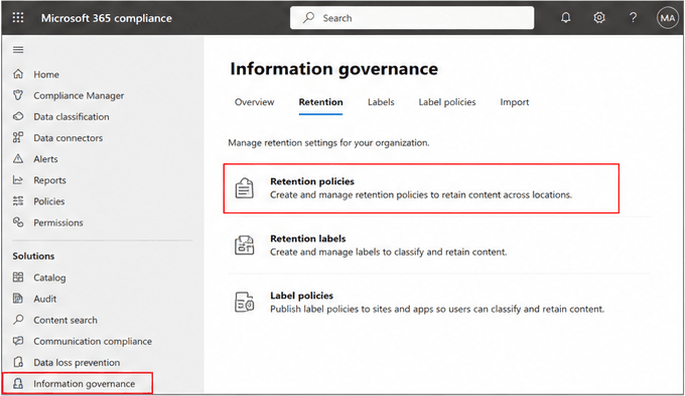
- Click Retention Policies > Create.
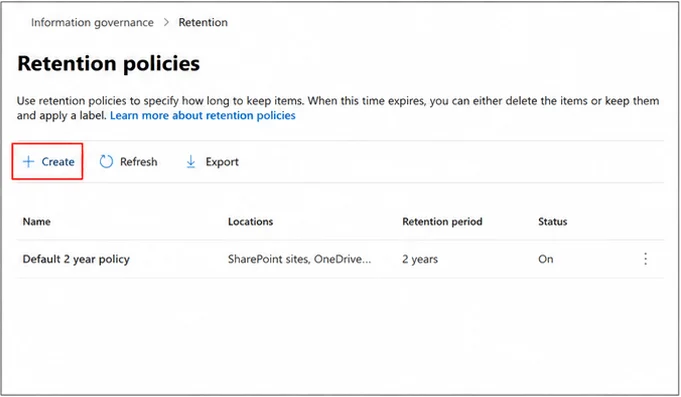
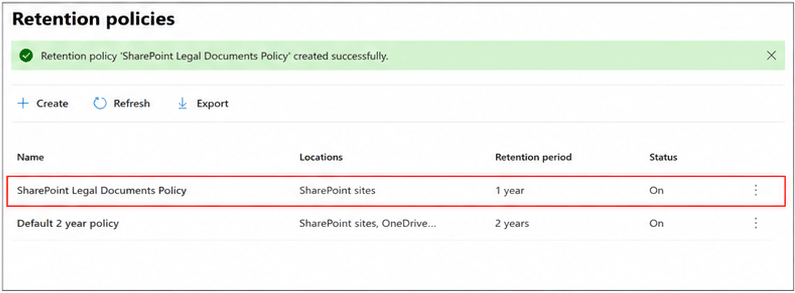
- Name your policy (e.g., ‘SharePoint Legal Documents Policy’).
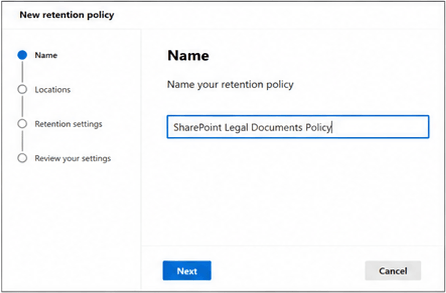
- Select Location > Choose SharePoint Sites.
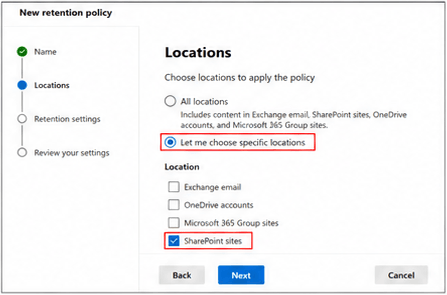
- Define retention settings:
- Retain content for a specific duration (e.g., 1 year).
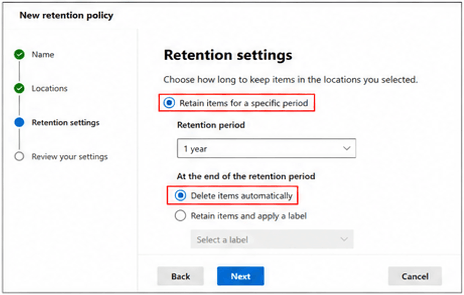
- Delete items after the retention period or retain only.
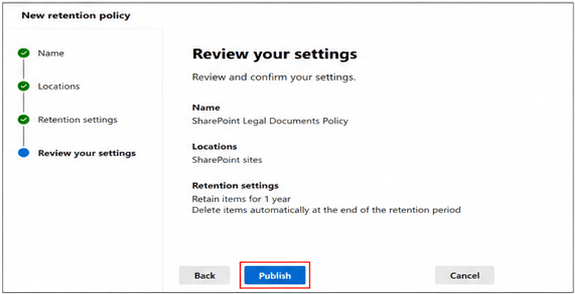
- Review and publish the policy.
- The policy will automatically apply to selected SharePoint sites.
Understanding OneDrive Policies
What is a OneDrive Retention Policy?
A OneDrive retention policy manages how long user files stored in OneDrive accounts are retained before being deleted. It is beneficial for handling inactive accounts, employee offboarding, or ensuring compliance.
Reasons for Setting Up a SharePoint Retention Policy
- Protects valuable business data from being lost when employees leave the organisation.
- Moreover, ensures continuity by keeping essential user files available for future use.
- Most importantly, it supports compliance with legal and regulatory data retention requirements.
- In the same way, it enhances security by automatically disposing of files that are no longer in needs.
- Minimises manual effort for administrators by automating retention and cleanup tasks.
Creating a OneDrive Retention Policy: A Complete Walkthrough
- Go to Microsoft 365 Compliance Centre.
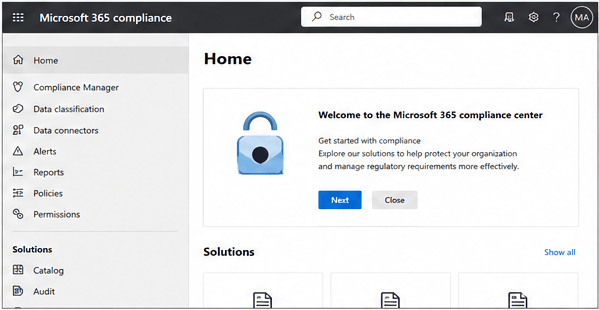
- Navigate to Information Governance > Retention Policies.
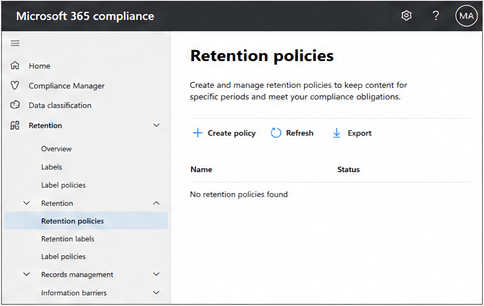
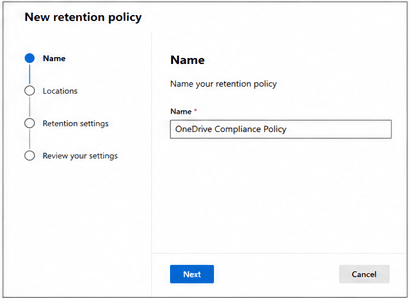
- Click Create Policy and provide a name (e.g., ‘OneDrive Compliance Policy’).
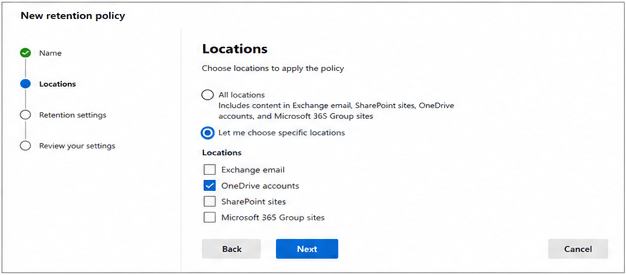
- Choose OneDrive Accounts under locations.
- Configure settings:
- Retain items for ‘X’ years/months.
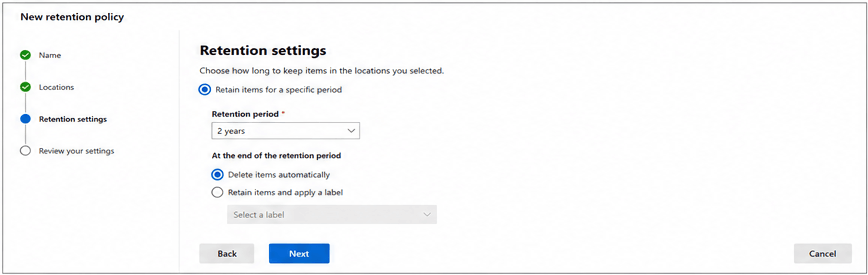
- Automatically delete after the retention period.
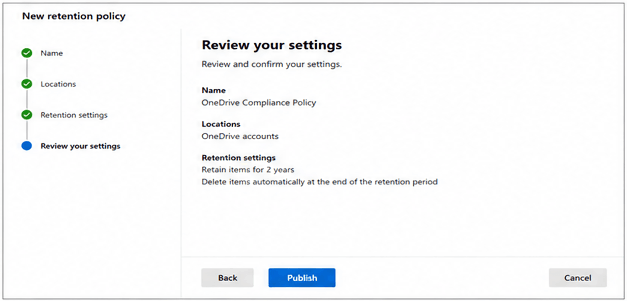
- Review and Publish.
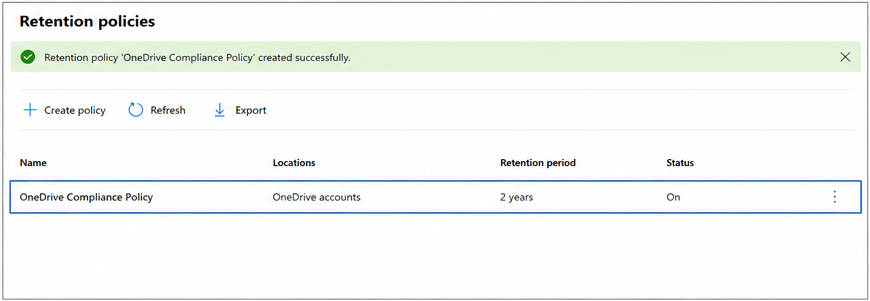
- The policy applies to all selected OneDrive accounts.
How Do Retention Policies Work in SharePoint and OneDrive?
| Features | SharePoint Retention Policy | OneDrive Retention Policy |
|---|---|---|
| Scope | Site collections, libraries, and lists. | Individual user OneDrive accounts. |
| Purpose | Preserve collaborative documents & records. | Retain User-specific files and personal storage. |
| Use Case | Regulatory compliance, project documentation. | Employee offboarding, user lifecycle management. |
| Retention Duration | Defined by admin (years/months). | Defined by admin (years/months). |
| Deletion | Items auto-deleted after policy expiration. | Files removed after the retention period. |
Best Practices for Applying Retention in SharePoint and OneDrive to Manage Data
- Establish specific retention periods that align with your organisation’s legal, regulatory, and business needs. It ensures data is kept for as long as required—and no longer.
- Moreover, periodically reassess your retention policies to confirm they remain relevant and practical. Business needs, regulations, or organisational priorities may change over time.
- Implement retention policies only where they are genuinely required. Over-retention can increase storage costs, create clutter, and expose your organisation to unnecessary risks.
- Run pilot tests with a small group or department to validate that the policies work as expected and do not disrupt business workflows, before applying them organisation-wide.
- Provide training and resources so that users understand how retention impacts files, emails, and site content. Awareness helps prevent confusion and promotes compliance.
- Microsoft 365 audit logs and reporting tools are used to track how retention policies are applied. Monitoring ensures policies are effective and supports accountability in compliance audits.
Gist of the Blog:
SharePoint Online and OneDrive retention policies are essential for compliance, security, and efficient data lifecycle management. By implementing well-structured retention strategies, organisations can safeguard business-critical content, meet regulatory obligations, and ensure smooth user management. Moreover, it is suggested to have a timely backup of the SharePoint Site, and Shoviv SharePoint Backup Tool is a one-stop solution for this. Explore this utility by trying its demo version.
Frequently Asked Questions:-
Both, Site Recycle Bin Period and the Site Collection Recycle Bin period for SharePoint are 93 days.
Yes. You can apply the same retention policy for both SharePoint sites and OneDrive accounts.
The retention period restarts from the last modified date, depending on the policy configuration.
Yes, retention policies ensure files from inactive accounts are preserved for the defined duration before deletion.
No, once published, retention policies are enforced at the system level and cannot be bypassed by end users.
Policies may take up to one day to take effect across SharePoint Online and OneDrive.