Summary: If you’re wondering how to change your Gmail username or email address without losing history or creating a new account, the answer isn’t always straightforward. Gmail has traditionally restricted username changes, but recent updates and smart workarounds make it easier to manage or transition your email identity. This guide explains what’s actually possible, when you can or can’t change your Gmail address, and how to do it safely without losing data.
Gmail is one of the most widely used email services in the world, used for personal, professional, and business communication. A Gmail Address (also called an email ID or username) is the unique identity you use to send, receive, and access services like Google Drive, YouTube, and more.
Because this email address is tied to your entire digital identity, changing it isn’t always simple—but it has become more flexible in recent updates.
Can You Change Your Gmail Username?
For years, the answer was no—you couldn’t change your Gmail username. However, things are evolving. Depending on your account and the availability of features, the answer is now:
“Sometimes yes, but mostly limited or conditional.”
When You Can’t Change Your Gmail Username?
- If you’re using a standard @gmail.com account (most users).
- If the feature hasn’t rolled out to your account yet.
- If a workplace or school manages your account.
- If recently changed your address (12-month restriction applies).
In these cases, you cannot directly change your Gmail username.
When Can You Change Your Gmail Username?
- If Google’s new address-change feature is available in your account.
- If you’re using a Google Workspace (business) account.
- Your admin allows changes (for work/school emails).
In supported accounts, you can choose a new Gmail username while keeping your data intact.
Why Changing Gmail Username Can Be Useful?
There are several practical reasons why people want to change their Gmail address:
- Unprofessional Email ID
- Old usernames like coolboy123 or princess2005 may not look suitable for work.
- Name Change
- After marriage or personal changes, users may want a new identity.
- Spam & Security Issues
- If your email is exposed, changing it can help reduce unwanted messages.
- Better Personal Branding
- A clean email like firstname.lastname@gmail.com looks more credible.
How to Easily Change Username in Your Gmail Account?
If the feature is available for your account, follow these steps:
Step 1: Open a Google Account
- Go to your Google Account settings
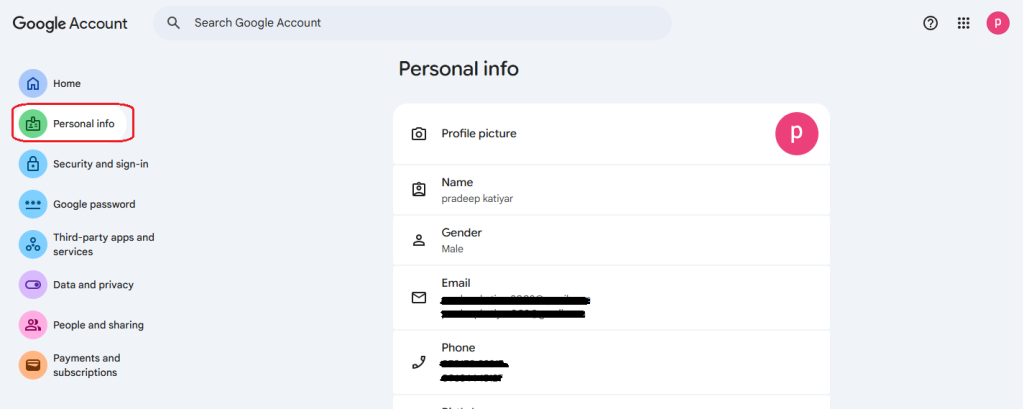
Step 2: Navigate to Personal Info
- Click on ‘Personal info’ from the menu.
Step 3: Access Email Settings
- Under Contact Info, select your email.
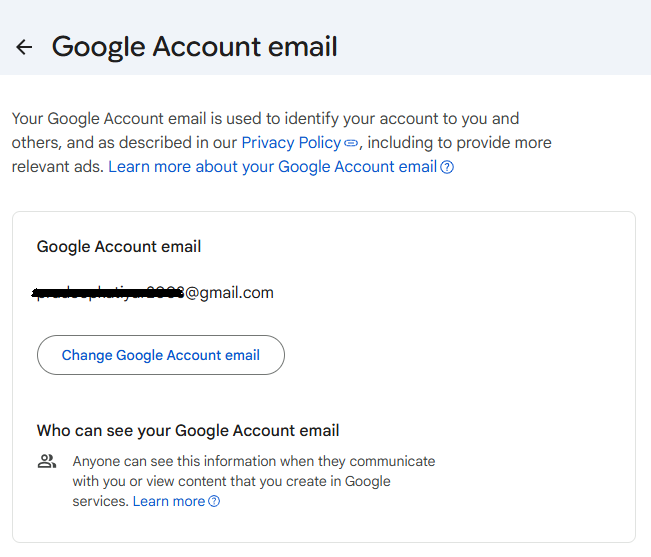
Step 4: Check Availability
- If you see an option like ‘Change Google Account email,’ you can proceed.
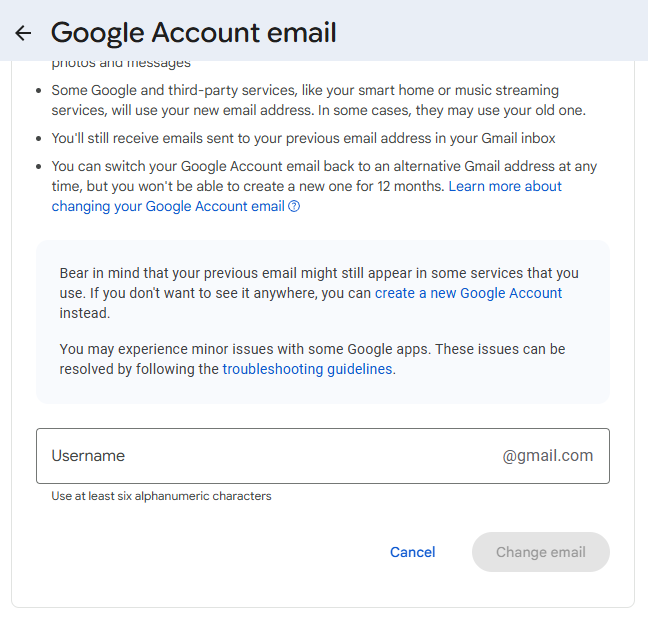
Step 5: Enter New Address
- Type your desired Gmail username and check availability.
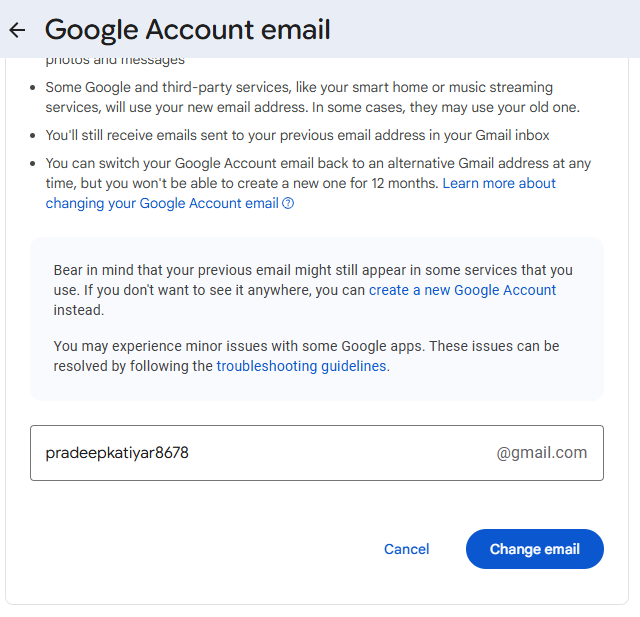
Step 6: Verify Identity
- Confirm using your password or verification code.
Step 7: Confirm Changes
- Submit, and your new Gmail address becomes active.
If you don’t see this option, the feature hasn’t reached your account yet.
What Happens to Your Old Email Address?
It is one of the most important parts. Let’s see what happens:
- Your old Gmail address becomes an alias.
- Emails sent to the old address still reach your inbox.
- You can log in using both old and new addresses.
- Your data remains unchanged (emails, drive, Photos, etc.)
- No one else can claim your old email.
It ensures a smooth transition without losing important information.
Limitations You Should Know
Even with the new feature, there are some restrictions:
- You can change your Gmail address only once every 12 months.
- There is a limit on total changes (usually up to 3 times).
- The feature is not available for all users yet.
- Some third-party apps may require re-login.
- Work/school accounts may have restricted permissions.
Alternative Ways to Change Gmail Address (Workarounds)
If you can’t change your Gmail address directly, here are effective alternatives:
1. Create a Gmail Alias (+Trick)
Example:
- yourname+work@gmail.com
- yourname+news@gmail.com
Helps organize emails without creating a new account.
2. Use Dots in Your Email
Gmail ignores dots:
- john.doe@gmail.com=johndoe@gmail.com
Useful for filtering incoming emails.
3. Change Display Name
- You can update the name that appears when sending emails.
It makes your email look professional without changing the address.
4. Add Another Email Address
- You can link another email and send messages from it inside Gmail.
It is helpful if you want to use a different email identity without leaving your main account.
Final Verdict
Changing a Gmail username or complete email address permanently has always been difficult, but recent updates have made it more flexible. While not every user can directly change their email ID yet, there are multiple ways to manage or transition their email identity without creating a new account or losing important data.
If you need to switch to a new Gmail account fully, managing emails manually can be time-consuming and risky. That is where the Shoviv Software becomes highly useful. It is a reliable solution for users who want a smooth and secure transition to a new Gmail address or want to back up emails for any purpose.
Frequently Asked Questions:-
Yes, you can change your display name, but changing the actual Gmail address depends on feature availability.
Only if the new Gmail update is available in your account; otherwise, it is not possible.
No, your data remains safe, and your old address works as an alias.
Yes, both can work for login and receiving emails.
Using a professional tool like Shoviv Software ensures a smooth and secure transition.