Summary: If you are planning to migrate Yandex Mail to Microsoft 365 Outlook Mail, this guide will help you understand the available methods. Here, you will learn how to transfer emails from Yandex to Office 365 using both manual and professional approaches, along with their limitations and the most reliable way to migrate.
Yandex Mail is a cloud-based email service that allows users to send, receive, and manage emails with basic features and limited storage. It is commonly used for personal and small-scale communication.
On the other hand,Microsoft 365 provides a professional email environment through Outlook Mail, which offers advanced email management, greater storage capacity, and integration with various Microsoft services. Businesses and professionals widely use it for secure and organised communication.
Reasons to Migrate Yandex Mail to Microsoft 365 Outlook Mail
There are several reasons why users choose Yandex Mail over Microsoft 365 migration:
- Enhanced Security – Microsoft 365 offers advanced protection features such as encryption and multi-factor authentication.
- Better Email Management – Outlook Mail provides features like rules, filters, and a focused inbox for managing emails efficiently.
- Large Storage Capacity – Compared to Yandex Mail, Office 365 offers more space for storing emails and attachments.
- Improved Collaboration – Integration with tools like Teams and OneDrive helps users work more efficiently.
- Accessibility Across Devices – Users can access their emails anytime from desktop, mobile, or web.
Manual Method to Migrate Emails from Yandex to Office 365
There is no direct option for Yandex Mail to Microsoft 365 migration, but users can use an IMAP-based approach through Outlook.
Using Outlook (IMAP Configuration)
- Enable IMAP access in your Yandex Mail account.
- Open Outlook and add your Yandex account.
- Enter IMAP server details:
- Incoming: imap.yandex.com (Port 993, SSL)
- Outgoing: smtp.yandex.com (Port 465, SSL)
- Add your Microsoft 365 account to Outlook.
- Allow both accounts to sync.
- Select emails or folders from Yandex Mail.
- Copy or move them into your Office 365 mailbox.
This method helps to migrate emails from Yandex to Office 365, but it requires manual effort.
Drawbacks of the Manual Method
Manual migration has several limitations:
- Only emails are migrated (no contacts or calendars)
- Time-consuming for large mailboxes
- Requires technical knowledge
- Risk of data duplication or missing emails.
- No proper progress tracking
- Depends on Outlook and internet stability.
Professional Method to Migrate Yandex Mail to Microsoft 365 Outlook Mail
To avoid manual complications, a professional solution is recommended. The Shoviv IMAP to Office 365 Migration Tool allows users to migrate emails from Yandex to Office 365 directly without complex configurations. It simplifies the process and ensures accurate migration.
Key Features of Shoviv IMAP to Office 365 Migration Tool
- Supports IMAP-based migration (Yandex Mail included).
- Maintain folder hierarchy and data integrity.
- Allows bulk mailbox migration.
- Incremental export prevents duplicate data.
- Advanced filtering option for selective migration.
- Job-based processing and scheduling.
- Supports multiple mailbox migrations simultaneously
- Easy-to-use interface.
Performs Simple Steps for Yandex Mail to Microsoft 365 Migration
Step 1: Install and Open the Tool
- Launch the Shoviv IMAP to Microsoft 365 Migration Tool on your system.
Step 2: Add Yandex Mail as Source
- Configure your Yandex account using IMAP server details to create a project.
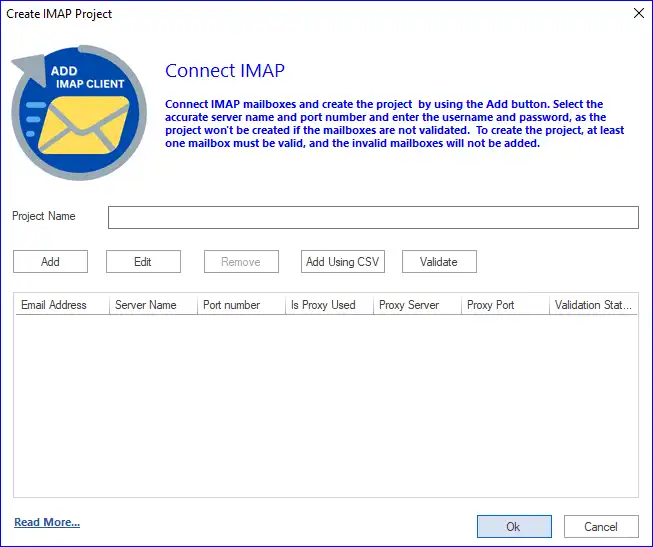
Step–3: Add Microsoft 365 as a Target
- Connect your Office 365 account securely.
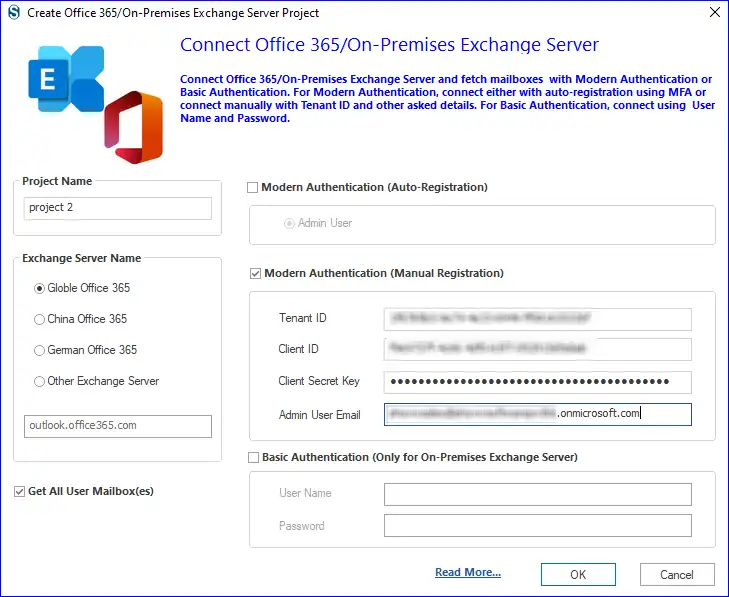
Step 4: Create a Migration Job
- Select the source and target mailboxes to begin the process.
Step 5: Map Mailboxes
- Match Yandex mailboxes with corresponding Office 365 mailboxes.
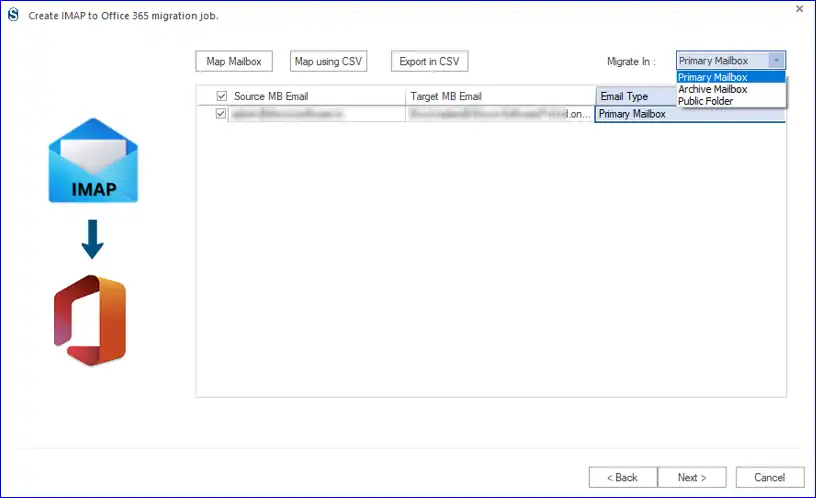
Step–6: Apply Filters (Optional)
- Use flyers to migrate selected emails based on date or folders.
Step 7: Configure Settings and Schedule
- Adjust settings like thread count and job scheduling.
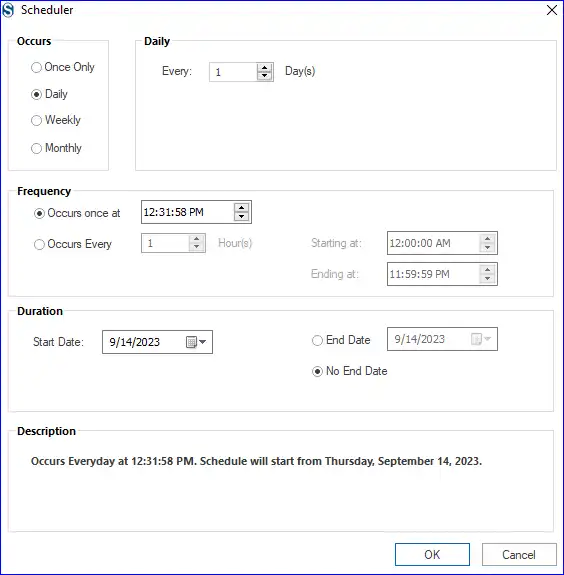
Step 8: Run and Monitor Migration
- Start the process and track progress until completion.
Conclusion
In this blog, we explained how to migrate Yandex Mail to Microsoft 365 Outlook Mail using both manual and professional methods. While manual methods can be used for basic migration, they come with several limitations.
For a more reliable and efficient solution, using the Shoviv IMAP to Office 365 Migration Tool is the better option. It simplifies the process and ensures safe and complete migration of your email data.
Frequently Asked Questions
Manual methods generally require Outlook for configuring and transferring emails.
Yes, but manual methods are limited. A professional tool provides better filtering options.
Manual methods are not suitable for bulk migration: professional tools are recommended.
Yes, it preserves the original folder hierarchy during migration.
Yes, the Shoviv IMAP to Office 365 Migration Tool allows scheduling and automation of migration tasks.